
Video editing demands precision, stability, power, and speed. This guide is built for professional editors, content creators, filmmakers, students, and anyone serious about crafting high-quality video, – cutting cinematic footage, producing content for YouTube, or creating visual stories for commercial work, the right laptop becomes your most critical creative partner.
An underpowered hardware is frustrating, leading to lagging previews, endless rendering, dropped frames, crashes mid-project.
Every cut, transition, or grade you apply is a real-time test of your system. Add multiple layers, 4K footage, complex effects, or motion graphics, and suddenly, your laptop starts struggling. Your productivity slows. Your inspiration gets interrupted.
A weak CPU that can’t handle export encoding. Limited RAM that chokes when you’re juggling multiple clips. Integrated graphics that fall apart under GPU-accelerated effects. Slow storage that can’t feed data fast enough to your timeline. These problems compound quickly, especially in high-resolution or multi-cam projects.
Key Criteria for Choosing the Right Laptop for Video Editing
Processing power sits at the top. Video editing is a CPU-intensive process, especially during rendering and exporting. A modern, multi-core processor like an Intel Core i7 or i9 (12th Gen or newer), or an AMD Ryzen 7 or 9 (7000 series), ensures that your system doesn’t bottleneck during editing.
Next comes graphics performance. For effects, transitions, playback, and export, your GPU must support hardware acceleration. A dedicated NVIDIA RTX 4060 or higher is ideal for 4K editing. NVIDIA’s Studio Drivers also provide added stability for creative applications like Adobe Premiere Pro, DaVinci Resolve, or Final Cut (on macOS).
Memory (RAM) directly affects how many clips, effects, and programs you can run simultaneously. 16GB is the minimum, but for serious video editing, especially with 4K, multi-cam, or color grading, 32GB provides a much smoother experience.
When it comes to storage, speed and capacity are equally important. A 1TB NVMe SSD is the sweet spot for fast project load times and enough space for media files and cache. Avoid mechanical drives.
Display quality is often overlooked, but it’s critical. You’re judging colors, contrast, and detail. Aim for a 15.6″ or 16″ IPS display with Full HD (at minimum) or 4K resolution, and 100% sRGB or DCI-P3 color accuracy. Brightness of at least 400 nits helps if you’re editing in varied lighting conditions.
Port selection is another practical concern. You’ll need Thunderbolt or USB-C for fast media transfers, HDMI or DisplayPort for external monitors, and ideally a full-size SD card reader for direct footage import.
This is more than just a spec sheet, it’s a practical guide to help you find the laptop that fits your workflow. We focus on laptops that are balanced for performance, portability, thermal efficiency, and display quality. Each recommendation is grounded in real-world editing needs.
Whether you’re editing in Adobe Premiere Pro, Final Cut Pro, DaVinci Resolve, Filmora, or Pinnacle Studio, the systems we highlight deliver across all platforms. You’ll get reliable playback, fast export times, and a stable environment for color work, effects, and sound.
So, whether you are working on a school project, film, YouTube video, documentary or starting out as a vlogger and filmmaker, these laptops suitable for video editing, satisfy the optimum requirements listed above and ensure that you have a smooth workflow when producing your work. Also check out; best laptops for Adobe Premiere Pro in addition to the best laptops for DaVinci Resolve.
Best 2026 Laptops for Editing Videos:
Contents
- ASUS ROG Strix G16 (2023) Gaming Laptop, 16” Nebula Display QHD 240Hz, GeForce RTX 4070
- ASUS ROG Strix G16 Gaming Laptop 16 FHD+ 165Hz (Intel 13th Gen Core i7-13650H, 64GB DDR5 RAM
- Dell G16 7630 Gaming Laptop - 16-inch (2560 x 1600) QHD+ 165Hz 3ms Display, Intel Core i9-13900HX
- GIGABYTE A5 X1 - 15.6 FHD IPS Anti-Glare 240Hz - AMD Ryzen™ 9 5900HX - NVIDIA GeForce RTX 3070 Laptop GPU 8 GB GDDR6 - 16 GB Memory - 512 GB PCIe SSD
- MSI Vector GP76 17.3 FHD 360Hz Gaming Laptop Intel Core i9-12900HK RTX 3080 32GB 1TB NVMe SSD
- Asus TUF 15.6 144Hz FHD Gaming Laptop 11th Gen Intel Core i7-11800H NVIDIA GeForce RTX 3050 Ti 16GB RAM 512GB SSD
- Lenovo Legion 5 Gaming Laptop, 15.6 FHD Display, AMD Ryzen 7 5800H, 16GB RAM, 512GB Storage, NVIDIA GeForce RTX 3050Ti
- HP - Victus 15.6 FHD 144Hz Gaming Laptop - Intel Core i5-12450H - NVIDIA GeForce GTX 1650 - HDMI 2.1 - Type-C - Mica Silver wHDMI (32GB RAM 2TB PCIe SSD
- ASUS TUF Dash F15 Ultra Slim 15.6 Gaming Laptop, 144Hz FHD, Intel i7-11370H(Up to 4.8GHz), NVIDIA Geforce RTX 3050 Ti, 16GB DDR4 RAM, 1TB NVMe SSD
- MSI GF63 Thin 3050 Gaming Laptop, 15.6 FHD 144Hz IPS Display, 11th Gen Core i5-11400H, GeForce RTX 3050 4GB, 16GB DDR4 RAM, 1TB PCIe SSD
ASUS ROG Strix G16 (2023) Gaming Laptop, 16” Nebula Display QHD 240Hz, GeForce RTX 4070 |
|
|---|---|
 Check This On Amazon |
|
| CPU | Intel Core i9-13980HX |
| GPU | GeForce RTX 4070 |
| Display Size | 16” |
| Display Resolution | 2560 x 1600 pixels |
| RAM | 32GB DDR5 |
| Storage Space | 1TB PCIe SSD |
| Operating System | Windows 11 |
| Ports | USB, Audio, Ethernet |
| Dimensions (L x W x H) | 13.94 x 0.89 x 10.39 inches |
| Weight | 9.97 pounds |
| Advantages | Quality Build, Outstanding performance |
| Disadvantages | Weight |
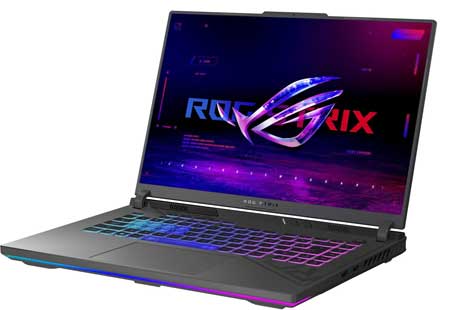
ASUS ROG Strix G16 Gaming Laptop 16 FHD+ 165Hz (Intel 13th Gen Core i7-13650H, 64GB DDR5 RAM |
|
|---|---|
 Check This On Amazon |
|
| CPU | 13th Gen Intel Core i7-13650HX |
| GPU | NVIDIA GeForce RTX 4060 8 GB GDDR6 |
| Display Size | 16" FHD+ |
| Display Resolution | 1920 x 1200) IPS Anti-glare |
| RAM | 64GB (32GB x 2) DDR5 4800MHz RAM |
| Storage Space | 1TB PCIe M.2 SSD |
| Operating System | Windows 11 |
| Ports | USB 3.2 Gen 2 Type-C support DisplayPort / power delivery / G-SYNC, 2 x USB 3.2 Gen 2 Type-A, Thunderbolt 4 support DisplayPort, HDMI 2.1 FRL, 3.5mm Combo Audio Jack, Ethernet Port RJ-45; Wi-Fi 6E(802.11ax) (Triple band) 2*2 + Bluetooth 5.3 |
| Dimensions (L x W x H) | 13.9 x 0.89 x 10.39 inches |
| Weight | 5.51 pounds |
| Advantages | Very good performance, Quality display, Good build |
| Disadvantages | Quite heavy for some people |
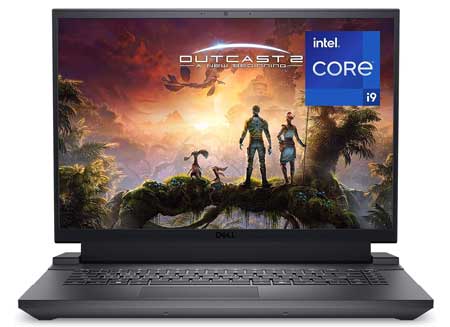
Dell G16 7630 Gaming Laptop - 16-inch (2560 x 1600) QHD+ 165Hz 3ms Display, Intel Core i9-13900HX |
|
|---|---|
 Check This On Amazon |
|
| CPU | Intel Core i9-13900HX |
| GPU | NVIDIA GeForce RTX 4070 8GB |
| Display Size | 16 inches |
| Display Resolution | 2560 x 1600 pixels |
| RAM | 16GB DDR5 |
| Storage Space | TB SSD |
| Operating System | Windows 11 |
| Ports | HDMI, USB, Ethernet, Audio |
| Dimensions (L x W x H) | 11.37 x 14.05 x 0.98 inches |
| Weight | 6.01 pounds |
| Advantages | High performance, Quality display, Reasonably priced |
| Disadvantages | |
Best Performance Laptop for Video Editing
GIGABYTE A5 X1 - 15.6 FHD IPS Anti-Glare 240Hz - AMD Ryzen™ 9 5900HX - NVIDIA GeForce RTX 3070 Laptop GPU 8 GB GDDR6 - 16 GB Memory - 512 GB PCIe SSD |
|
|---|---|
 Check This On Amazon |
|
| CPU | AMD Ryzen 9 5900HX Mobile Processor |
| GPU | NVIDIA GeForce RTX 3070 Laptop GPU 8 GB GDDR6 |
| Display Size | 15.6 inches |
| Display Resolution | FHD 1920x1080 IPS-level |
| RAM | 16 GB DDR4 |
| Storage Space | 512 GB PCIe SSD |
| Operating System | Windows 11 |
| Ports | 1 x HDMI 2.0 (with HDCP), 1x mini DP 1.4, 1x DisplayPort 1.4 (Type-C) over USB 3.2 Gen 2, 1 x USB 2.0 (Type-A), 1 x USB 3.2 Gen1 (Type-A), 1 x USB 3.2 Gen2 (Type-A) |
| Dimensions (L x W x H) | 10.15 x 14.21 x 1.36 inches |
| Weight | 4.68 pounds |
| Advantages | Outstaning performance |
| Disadvantages | Storage Space |
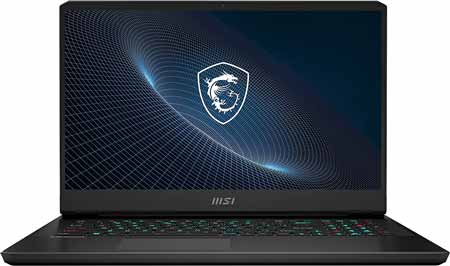
MSI Vector GP76 17.3 FHD 360Hz Gaming Laptop Intel Core i9-12900HK RTX 3080 32GB 1TB NVMe SSD |
|
|---|---|
 Check This On Amazon |
|
| CPU | Intel Core i9-12900HK |
| GPU | NVIDIA GeForce RTX 3080 Laptop GPU |
| Display Size | 17.3 inches |
| Display Resolution | 1920x1080 pixels |
| RAM | 32GB |
| Storage Space | 1TB NVMe SSD |
| Operating System | Windows 11 |
| Ports | USB, Ethernet, Audio |
| Dimensions (L x W x H) | 22.32 x 4.25 x 15.31 inches |
| Weight | 9.52 lbs |
| Advantages | Outstanding performance |
| Disadvantages | Weight |
Best Intel Core i7 Laptop for Video Editing
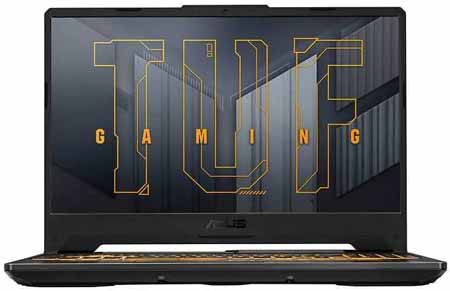
Asus TUF 15.6 144Hz FHD Gaming Laptop 11th Gen Intel Core i7-11800H NVIDIA GeForce RTX 3050 Ti 16GB RAM 512GB SSD |
|
|---|---|
 Check This On Amazon |
|
| CPU | Intel Core i7-11800H |
| GPU | NVIDIA GeForce RTX 3050 Ti |
| Display Size | 15.6 inches |
| Display Resolution | 144Hz FHD |
| RAM | 16GB |
| Storage Space | 512GB SSD |
| Operating System | Windows 11 |
| Ports | USB, Ethernet, Audio, HDMI |
| Dimensions (L x W x H) | 14.2 x 10.1 x 1 inches |
| Weight | 5.07 pounds |
| Advantages | Performance, Design and Build Quality |
| Disadvantages | n/a |
Best Ryzen 7 Laptop for Video Editing
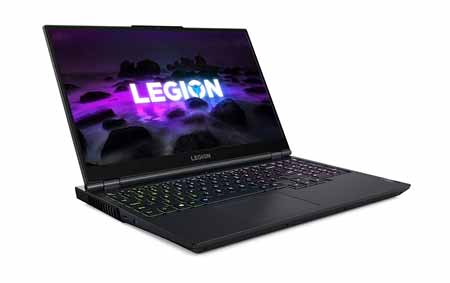
Lenovo Legion 5 Gaming Laptop, 15.6 FHD Display, AMD Ryzen 7 5800H, 16GB RAM, 512GB Storage, NVIDIA GeForce RTX 3050Ti |
|
|---|---|
 Check This On Amazon |
|
| CPU | AMD Ryzen 7 5800H |
| GPU | NVIDIA GeForce RTX 3050Ti |
| Display Size | 15.6 inches |
| Display Resolution | 1920 x 1080 Pixels |
| RAM | 16GB |
| Storage Space | 512 GB SSD |
| Operating System | Windows 10 |
| Ports | Built-in 720p webcam with e-shutter, WiFi 6, Bluetooth 5.0, USB-C, 4 USB, HDMI 2.1, DisplayPort 1.4, RJ45 Ethernet |
| Dimensions (L x W x H) | 14.27 x 10.26 x 0.89 inches |
| Weight | 5.29 pounds |
| Advantages | Very good performance |
| Disadvantages | Storage sapce |
Best Mid-Range Laptop for Video Editing
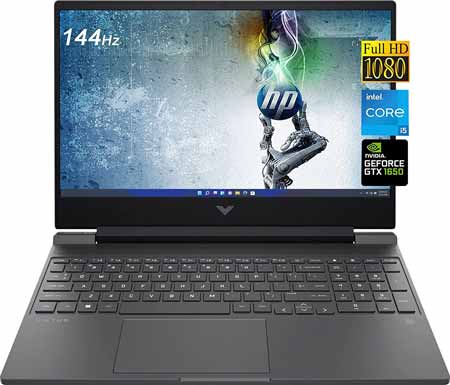
HP - Victus 15.6 FHD 144Hz Gaming Laptop - Intel Core i5-12450H - NVIDIA GeForce GTX 1650 - HDMI 2.1 - Type-C - Mica Silver wHDMI (32GB RAM 2TB PCIe SSD |
|
|---|---|
 Check This On Amazon |
|
| CPU | Intel Core i5-12450H |
| GPU | NVIDIA GeForce GTX 1650 |
| Display Size | 15.6 inches |
| Display Resolution | FHD (1920 x 1080), 144 Hz, 9 ms response time, IPS, micro-edge, antiglare |
| RAM | 32GB |
| Storage Space | 2TB PCIe SSD |
| Operating System | Windows 11 |
| Ports | 1x SuperSpeed USB Type-C 5Gbps signaling rate (DisplayPort 1.4, HP Sleep and Charge) 1x SuperSpeed USB Type-A 5Gbps signaling rate (HP Sleep and Charge) 1x SuperSpeed USB Type-A 5Gbps signaling rate 1x RJ-45 1x Headphone/microphone combo 1x AC smart pin 1x HDMI 2.1 |
| Dimensions (L x W x H) | 14.09 x 10.04 x 0.93 inches |
| Weight | 6.78 pounds |
| Advantages | Large storage, quality display, affordable |
| Disadvantages | |
Best Budget Laptop for Video Editing
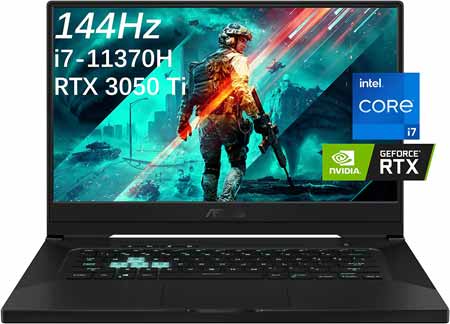
ASUS TUF Dash F15 Ultra Slim 15.6 Gaming Laptop, 144Hz FHD, Intel i7-11370H(Up to 4.8GHz), NVIDIA Geforce RTX 3050 Ti, 16GB DDR4 RAM, 1TB NVMe SSD |
|
|---|---|
 Check This On Amazon |
|
| CPU | Intel i7-11370H(Up to 4.8GHz) |
| GPU | NVIDIA Geforce RTX 3050 Ti |
| Display Size | 15.6" |
| Display Resolution | FHD (1920 x 1080) , 144Hz Refresh Rate, 16:9, anti-glare IPS display, Game at pro speed with a lightning fast IPS-level panel |
| RAM | 16GB 3200MHz |
| Storage Space | 1TB SSD |
| Operating System | Windows 10 |
| Ports | Ethernet, USB, Audio, HDMI |
| Dimensions (L x W x H) | 14.17 x 9.92 x 0.78 inches |
| Weight | 4.41 lbs |
| Advantages | Lightweight with large storage |
| Disadvantages | n/a |
Best Laptop for Video Editing Students and Beginners
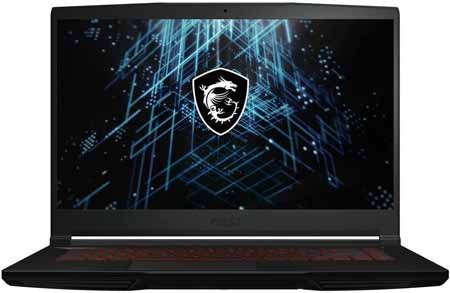
MSI GF63 Thin 3050 Gaming Laptop, 15.6 FHD 144Hz IPS Display, 11th Gen Core i5-11400H, GeForce RTX 3050 4GB, 16GB DDR4 RAM, 1TB PCIe SSD |
|
|---|---|
 Check This On Amazon |
|
| CPU | 11th Gen Core i5-11400H |
| GPU | GeForce RTX 3050 4GB |
| Display Size | 15.6" |
| Display Resolution | FHD 144Hz IPS Display |
| RAM | 16GB DDR4 |
| Storage Space | 1TB PCIe SSD |
| Operating System | Windows 11 |
| Ports | 1x USB Type-C, 3x USB Type-A, 1x RJ45, 1x Headphone/Microphone Port |
| Dimensions (L x W x H) | 14.13 x 9.99 x 0.85 inches |
| Weight | 8 pounds |
| Advantages | Good performance |
| Disadvantages | Weight |
Also, have a look at:
Best Laptop recommendations for Avid Media Composer
Top laptops for running Video Pro X