
Revit is not just CAD—it’s BIM. And that distinction matters, because Revit isn’t merely about drawing lines or modeling spaces. It’s about crafting intelligent, parametric building systems where architecture, structure, and MEP converge.
This guide is written for architects, structural engineers, MEP designers, construction managers, and BIM coordinators. If you’re handling architectural drawings, family creation, clash detection, or linked models in a collaborative cloud setup, you need a laptop that keeps Revit’s performance fluid and stable across design stages.
Revit isn’t demanding in the same way as a game engine or rendering software, but its hybrid processing load—data management, real-time view generation, geometry handling—makes hardware selection critical. Without the right specs, even a small model can feel sluggish, while large BIM files become unmanageable.
That’s why we created this guide to help you confidently choose a laptop that accelerates your Revit workflow. Here’s what we assess when identifying the best laptops for Revit:
CPU: Revit is predominantly single-threaded, meaning most of its core functions, like opening files, generating views, or modifying geometry—rely on strong single-core performance. That’s why we recommend laptops with Intel Core i7 or i9 H-series (13th/14th Gen) or AMD Ryzen 7 or 9 7000-series. A base clock speed above 3.5GHz with turbo boost capacity ensures snappy model updates and quick view generation.
GPU: While Revit isn’t GPU-intensive for modeling, it still uses the GPU for smooth zooming, orbiting, shadows, and visual styles. For seamless navigation and presentation, especially in shaded or realistic views, we recommend NVIDIA RTX 3050, RTX 3060, or RTX A2000 as a baseline. For those who render inside Revit (with Enscape or Twinmotion), RTX 3070 or RTX 4070/4080 gives you future-ready headroom.
RAM: Revit loves memory. If you’re working with linked models, large central files, or cloud collaboration, RAM keeps everything fluid. We recommend 32GB of DDR5 RAM, with 16GB as the bare minimum for students or early professionals. For advanced workflows involving phasing, design options, MEP coordination, or point clouds, even 64GB can make a noticeable difference.
Storage: You’ll be handling large RVT files, caches, families, and BIM 360 syncs. A 1TB PCIe Gen 4 NVMe SSD offers fast load times and smooth autosaves. For project-intensive environments, dual SSDs or expandable storage ensures longevity and flexibility.
Display: In architecture and BIM, detail is everything. You need a 15.6″ or larger display with at least FHD (1920×1080), but we strongly recommend QHD+ (2560×1600) or 4K displays for clear annotation, clean lines, and multi-window workflows. Look for 100% sRGB or better, especially if you export presentation visuals or collaborate with rendering teams.
Thermal Design: Thermal throttling ruins view generation times. Choose laptops with dual-fan or vapor chamber cooling, especially when working with high file complexity, multiple linked models, or Dynamo scripts. The goal is consistent performance over 6–8 hour work sessions.
Build Quality: Whether you’re moving between office, job site, or studio, you want a machine that can withstand daily transport, offer pro-grade I/O, and feel reliable under pressure. Look for builds under 5.5 lbs (≈2.5 kg) with strong chassis materials (aluminum or magnesium alloy), and full-size keyboards with numeric keypads for scheduling workflows and tagging.
Ports and Connectivity: You’ll be connecting to external displays, NAS systems, BIM 360 cloud servers, and printers. Make sure your laptop includes USB-A, USB-C/Thunderbolt 4, HDMI 2.1, and Ethernet or Wi-Fi 6E. Support for dual 4K displays is important for modeling plus schedule/sheet multitasking.
Revit workflows span design, documentation, analysis, and collaboration. These models excel in actual BIM workflows. Each recommendation has been vetted for its ability to handle linked models, view generation, annotations, and Dynamo scripting, with options for both Revit-only users and those integrating rendering tools like Enscape, Lumion, or Twinmotion.
You’ll find options for students just beginning their Revit journey, professionals in multi-disciplinary firms, and architects who want portable power without losing desktop-class speed.
Also see: best laptops for designers and the best laptops for Architecture Students.
Best 2026 Laptops For Revit;
Contents
- Acer Predator Helios Neo 16S AI 16 inches 2560 x 1600 Pixels, 32GB DDR5, 1TB PCIe Gen 4 SSD, Intel Core Ultra 9 386H, NVIDIA GeForce RTX 5070 Ti Laptop GPU 12GB GDDR7
- Dell Alienware 16X Aurora Ultra9 290HXPlus RTX5070Ti 32GB 2TB OLED 240Hz
- Dell Alienware 16 Area 51 Core Ultra 9 290HX Plus RTX5090 64GB 2TB OLED 240Hz
- Acer Nitro V 16 AI 16 inches 2560 x 1600 Pixels, 16GB DDR5, 1TB PCIe Gen 4 SSD, Intel Core Ultra 7 356H, NVIDIA GeForce RTX 5060 Laptop GPU 8GB GDDR7
- Acer Predator Helios Neo 16S AI 16 inches 2560 x 1600 Pixels, 16GB DDR5, 1TB PCIe Gen 4 SSD, Intel Core Ultra 7 356H, NVIDIA GeForce RTX 5060 Laptop GPU 8GB GDDR7
- Acer Nitro V 16 AI 16 inches 1920 x 1200 Pixels, 32GB DDR5, 1TB PCIe Gen 4 SSD, AMD Ryzen AI 9 465, NVIDIA GeForce RTX 5060 Laptop GPU 8GB GDDR7
- Dell Alienware 18 Area 51 Core Ultra 9 290HX Plus RTX5090 64GB 2TB WQXGA 300Hz
- Dell Alienware 18 Area 51 Core Ultra 9 290HX Plus RTX5090 32GB 1TB WQXGA 300Hz
- Dell Alienware 16 Area 51 Core Ultra 9 290HX Plus RTX5090 32GB 1TB OLED 240Hz
- Dell Alienware 16X Aurora Ultra9 290HXPlus RTX5060 32GB 1TB OLED 240Hz
- Dell Alienware 16X Aurora Ultra9 290HXPlus RTX5070 32GB 1TB OLED 240Hz
- Dell Alienware 16 Area 51 Core Ultra 9 290HX Plus RTX5070 32GB 1TB OLED 240Hz
- Dell Alienware 18 Area 51 Core Ultra 9 290HX Plus RTX5080 32GB 1TB WQXGA 300Hz
- Dell Alienware 16 Area 51 Core Ultra 9 290HX Plus RTX5080 32GB 1TB OLED 240Hz
- Dell Alienware 18 Area 51 Core Ultra 9 290HX Plus RTX5070Ti 32GB 1TB WQXGA 300Hz
- Dell Alienware 18 Area 51 Core Ultra 9 290HX Plus RTX5090 64GB 2TB WQXGA 300Hz
- Dell Alienware 16 Area 51 Core Ultra 9 290HX Plus RTX5090 64GB 2TB OLED 240Hz
- Dell Alienware 18 Area 51 Core Ultra 9 290HX Plus RTX5090 32GB 1TB WQXGA 300Hz
Best Overall Laptops for Revit
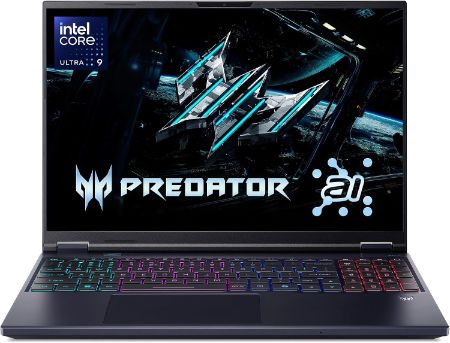
Acer Predator Helios Neo 16S AI 16 inches 2560 x 1600 Pixels, 32GB DDR5, 1TB PCIe Gen 4 SSD, Intel Core Ultra 9 386H, NVIDIA GeForce RTX 5070 Ti Laptop GPU 12GB GDDR7 |
|
|---|---|
 Check This On Amazon |
|
| CPU | Intel Core Ultra 9 386H |
| GPU | NVIDIA GeForce RTX 5070 Ti Laptop GPU 12GB GDDR7 |
| Display Size | 16 inches |
| Display Resolution | 2560 x 1600 Pixels; WQXGA OLED, 240Hz |
| RAM | 32GB DDR5 |
| Storage Space | 1TB PCIe Gen 4 SSD |
| Operating System | Windows 11 |
| Ports | Thunderbolt 4 USB-C, USB-A, HDMI 2.1, RJ45, audio combo jack |
| Dimensions (L x W x H) | 14.2 x 10.5 x 0.9 inches |
| Weight | 5.5 pounds |
| Pros | High refresh OLED; dedicated RTX graphics; suitable for gaming and creator tasks |
| Cons | Heavy; expensive; fan noise and heat under load |
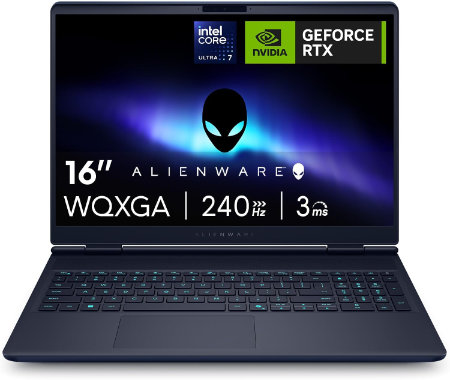
Dell Alienware 16X Aurora Ultra9 290HXPlus RTX5070Ti 32GB 2TB OLED 240Hz |
|
|---|---|
 Check This On Amazon |
|
| CPU | Intel Core Ultra 9 290HX Plus, 24 cores, up to 5.5 GHz |
| GPU | NVIDIA GeForce RTX 5070 Ti Laptop GPU, 12GB GDDR7 |
| Display Size | 16 inch, 16:10 |
| Display Resolution | 16 inch WQXGA 2560 × 1600 anti glare OLED, 240Hz, 120% DCI P3 color volume, 620 nits HDR, G SYNC |
| RAM | 32GB DDR5 5600 MT/s, 2 × 16GB |
| Storage Space | 2TB M.2 2280 PCIe Gen 5 SSD |
| Operating System | Windows 11 Home |
| Ports | 2 × USB A 5Gbps; 1 × USB C 10Gbps with Power Delivery; 1 × Thunderbolt 4 with DisplayPort 2.1; HDMI 2.1; 1GbE RJ45; headset jack; power connector |
| Dimensions (L x W x H) | 14.05 × 10.45 × 0.92 inches at rear (width × depth × maximum rear height) |
| Weight | 5.66 lb starting weight |
| Pros | 240Hz OLED; 96Wh battery; RTX 50 Series graphics; socketed DDR5 memory and high speed NVMe storage options |
| Cons | 5.66 lb starting weight |
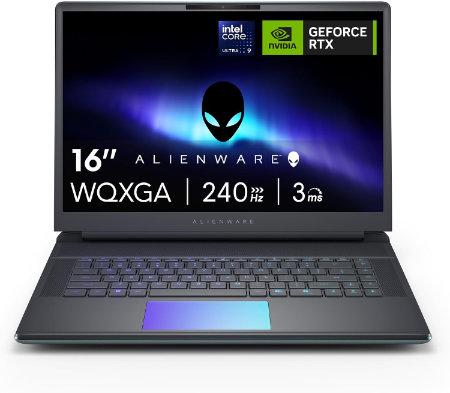
Dell Alienware 16 Area 51 Core Ultra 9 290HX Plus RTX5090 64GB 2TB OLED 240Hz |
|
|---|---|
 Check This On Amazon |
|
| CPU | Intel Core Ultra 9 290HX Plus, 24 cores, up to 5.5 GHz |
| GPU | NVIDIA GeForce RTX 5090 Laptop GPU, 24GB GDDR7 |
| Display Size | 16 inch, 16:10 |
| Display Resolution | 16 inch WQXGA 2560 × 1600 anti glare OLED, 240Hz, 120% DCI P3 color volume, 620 nits HDR, G SYNC |
| RAM | 64GB DDR5 6400 MT/s, 2 × 32GB CSoDIMM |
| Storage Space | 2TB M.2 2280 PCIe Gen 5 SSD |
| Operating System | Windows 11 Home or Windows 11 Pro |
| Ports | Global headset jack; 3 × USB A 3.2 Gen 1; 2 × Thunderbolt 4 for RTX 5070 and lower or 2 × Thunderbolt 5 for RTX 5070 Ti and higher; HDMI 2.1; SD card reader |
| Dimensions (L x W x H) | 14.37 × 11.41 × up to 1.12 inches (width × depth × maximum height) |
| Weight | 7.49 lb maximum system weight |
| Pros | Desktop class graphics options; high refresh OLED; 96Wh battery; user replaceable DDR5 memory and multiple SSD capacity options |
| Cons | Very heavy for daily travel |
Best Budget Laptops for Revit
Acer Nitro V 16 AI 16 inches 2560 x 1600 Pixels, 16GB DDR5, 1TB PCIe Gen 4 SSD, Intel Core Ultra 7 356H, NVIDIA GeForce RTX 5060 Laptop GPU 8GB GDDR7 |
|
|---|---|
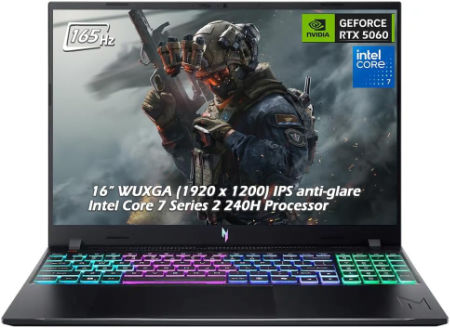 Check This On Amazon |
|
| CPU | Intel Core Ultra 7 356H |
| GPU | NVIDIA GeForce RTX 5060 Laptop GPU 8GB GDDR7 |
| Display Size | 16 inches |
| Display Resolution | 2560 x 1600 Pixels; WQXGA IPS, up to 180Hz |
| RAM | 16GB DDR5 |
| Storage Space | 1TB PCIe Gen 4 SSD |
| Operating System | Windows 11 |
| Ports | USB-C, USB-A, HDMI 2.1, RJ45, audio combo jack |
| Dimensions (L x W x H) | 14.2 x 10.5 x 1.1 inches |
| Weight | 5.7 pounds |
| Pros | Dedicated RTX GPU; high refresh display; memory and SSD upgrade potential |
| Cons | Heavy; base 16GB RAM may limit professional workloads; fan noise under gaming |
Acer Predator Helios Neo 16S AI 16 inches 2560 x 1600 Pixels, 16GB DDR5, 1TB PCIe Gen 4 SSD, Intel Core Ultra 7 356H, NVIDIA GeForce RTX 5060 Laptop GPU 8GB GDDR7 |
|
|---|---|
Check This On Amazon |
|
| CPU | Intel Core Ultra 7 356H |
| GPU | NVIDIA GeForce RTX 5060 Laptop GPU 8GB GDDR7 |
| Display Size | 16 inches |
| Display Resolution | 2560 x 1600 Pixels; WQXGA OLED, 240Hz |
| RAM | 16GB DDR5 |
| Storage Space | 1TB PCIe Gen 4 SSD |
| Operating System | Windows 11 |
| Ports | Thunderbolt 4 USB-C, USB-A, HDMI 2.1, RJ45, audio combo jack |
| Dimensions (L x W x H) | 14.2 x 10.5 x 0.9 inches |
| Weight | 5.5 pounds |
| Pros | OLED gaming display; dedicated RTX graphics; modern connectivity |
| Cons | 16GB RAM may be limiting; heavy; fans audible under load |
Acer Nitro V 16 AI 16 inches 1920 x 1200 Pixels, 32GB DDR5, 1TB PCIe Gen 4 SSD, AMD Ryzen AI 9 465, NVIDIA GeForce RTX 5060 Laptop GPU 8GB GDDR7 |
|
|---|---|
Check This On Amazon |
|
| CPU | AMD Ryzen AI 9 465 |
| GPU | NVIDIA GeForce RTX 5060 Laptop GPU 8GB GDDR7 |
| Display Size | 16 inches |
| Display Resolution | 1920 x 1200 Pixels; WUXGA IPS, 165Hz |
| RAM | 32GB DDR5 |
| Storage Space | 1TB PCIe Gen 4 SSD |
| Operating System | Windows 11 |
| Ports | USB-C, USB-A, HDMI 2.1, RJ45, audio combo jack |
| Dimensions (L x W x H) | 14.2 x 10.5 x 1.1 inches |
| Weight | 5.7 pounds |
| Pros | RTX graphics; 32GB RAM; high refresh screen; upgradeable storage |
| Cons | Heavy; FHD class resolution; battery life limited while gaming |
Best Laptops for Large Revit BIM Models
Dell Alienware 18 Area 51 Core Ultra 9 290HX Plus RTX5090 64GB 2TB WQXGA 300Hz |
|
|---|---|
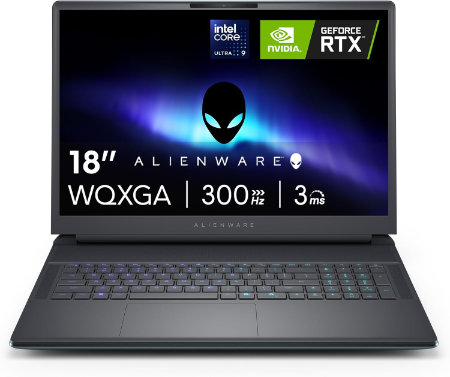 Check This On Amazon |
|
| CPU | Intel Core Ultra 9 290HX Plus, 24 cores, up to 5.5 GHz |
| GPU | NVIDIA GeForce RTX 5090 Laptop GPU, 24GB GDDR7 |
| Display Size | 18 inch, 16:10 |
| Display Resolution | 18 inch WQXGA 2560 × 1600, 300Hz, 500 nits, 100% DCI P3, Advanced Optimus, ComfortView Plus and G SYNC |
| RAM | 64GB DDR5 6400 MT/s, 2 × 32GB CSoDIMM |
| Storage Space | 2TB M.2 2280 PCIe Gen 5 SSD |
| Operating System | Windows 11 Home or Windows 11 Pro |
| Ports | USB A 3.2 Gen 1; USB C Thunderbolt ports depending on GPU tier; HDMI 2.1; SD card reader; global headset jack; RJ45 Ethernet |
| Dimensions (L x W x H) | 16.14 × 12.59 × 0.95 inches at front (width × depth × front height) |
| Weight | 9.56 lb maximum system weight |
| Pros | Very large 300Hz screen; flagship RTX 50 Series GPU options; 96Wh battery; replaceable DDR5 memory and multiple SSD options. |
| Cons | 9.56 lb maximum laptop weight plus a 2.20 lb power adapter; large desk focused chassis; battery life is short during gaming. Consider a RAM upgrade for demanding video work or large local development environments. |
Dell Alienware 18 Area 51 Core Ultra 9 290HX Plus RTX5090 32GB 1TB WQXGA 300Hz |
|
|---|---|
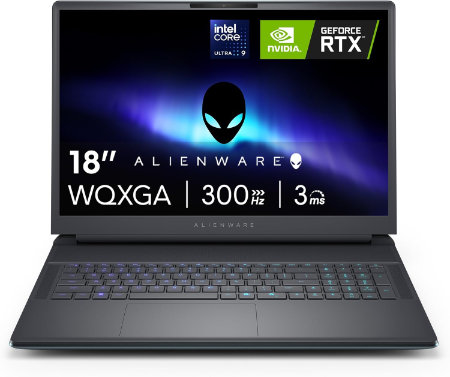 Check This On Amazon |
|
| CPU | Intel Core Ultra 9 290HX Plus, 24 cores, up to 5.5 GHz |
| GPU | NVIDIA GeForce RTX 5090 Laptop GPU, 24GB GDDR7 |
| Display Size | 18 inch, 16:10 |
| Display Resolution | 18 inch WQXGA 2560 × 1600, 300Hz, 500 nits, 100% DCI P3, Advanced Optimus, ComfortView Plus and G SYNC |
| RAM | 32GB DDR5 6400 MT/s, 2 × 16GB CSoDIMM |
| Storage Space | 1TB M.2 2230 PCIe Gen 4 ×4 TLC SSD |
| Operating System | Windows 11 Home or Windows 11 Pro |
| Ports | USB A 3.2 Gen 1; USB C Thunderbolt ports depending on GPU tier; HDMI 2.1; SD card reader; global headset jack; RJ45 Ethernet |
| Dimensions (L x W x H) | 16.14 × 12.59 × 0.95 inches at front (width × depth × front height) |
| Weight | 9.56 lb maximum system weight |
| Pros | Very large 300Hz screen; flagship RTX 50 Series GPU options; 96Wh battery; replaceable DDR5 memory and multiple SSD options |
| Cons | |
Dell Alienware 16 Area 51 Core Ultra 9 290HX Plus RTX5090 32GB 1TB OLED 240Hz |
|
|---|---|
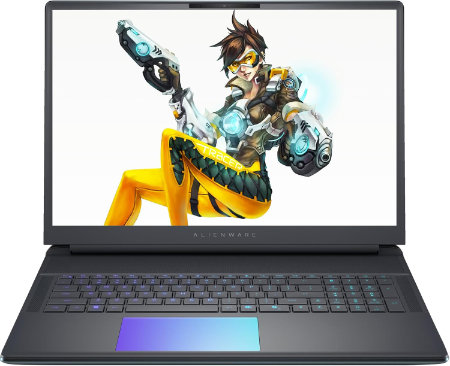 Check This On Amazon |
|
| CPU | Intel Core Ultra 9 290HX Plus, 24 cores, up to 5.5 GHz |
| GPU | NVIDIA GeForce RTX 5090 Laptop GPU, 24GB GDDR7 |
| Display Size | 16 inch, 16:10 |
| Display Resolution | 16 inch WQXGA 2560 × 1600 anti glare OLED, 240Hz, 120% DCI P3 color volume, 620 nits HDR, G SYNC |
| RAM | 32GB DDR5 6400 MT/s, 2 × 16GB CSoDIMM |
| Storage Space | 1TB M.2 2230 PCIe Gen 4 ×4 TLC SSD |
| Operating System | Windows 11 Home or Windows 11 Pro |
| Ports | Global headset jack; 3 × USB A 3.2 Gen 1; 2 × Thunderbolt 4 for RTX 5070 and lower or 2 × Thunderbolt 5 for RTX 5070 Ti and higher; HDMI 2.1; SD card reader |
| Dimensions (L x W x H) | 14.37 × 11.41 × up to 1.12 inches (width × depth × maximum height) |
| Weight | 7.49 lb maximum system weight |
| Pros | Desktop class graphics options; high refresh OLED; 96Wh battery; user replaceable DDR5 memory and multiple SSD capacity options. NVIDIA GeForce RTX 5090 Laptop GPU, 24GB GDDR7 makes this suitable for high end gaming and demanding GPU work. |
| Cons | |
Best Portable Laptops for Architects Using Revit
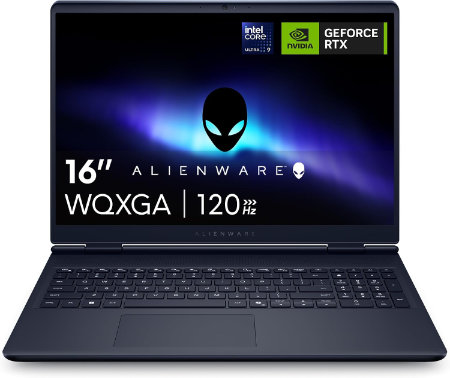
Dell Alienware 16X Aurora Ultra9 290HXPlus RTX5060 32GB 1TB OLED 240Hz |
|
|---|---|
 Check This On Amazon |
|
| CPU | Intel Core Ultra 9 290HX Plus, 24 cores, up to 5.5 GHz |
| GPU | NVIDIA GeForce RTX 5060 Laptop GPU, 8GB GDDR7 |
| Display Size | 16 inch, 16:10 |
| Display Resolution | 16 inch WQXGA 2560 × 1600 anti glare OLED, 240Hz, 120% DCI P3 color volume, 620 nits HDR, G SYNC |
| RAM | 32GB DDR5 5600 MT/s, 2 × 16GB |
| Storage Space | 1TB M.2 PCIe NVMe SSD |
| Operating System | Windows 11 Home |
| Ports | 2 × USB A 5Gbps; 1 × USB C 10Gbps with Power Delivery; 1 × Thunderbolt 4 with DisplayPort 2.1; HDMI 2.1; 1GbE RJ45; headset jack; power connector |
| Dimensions (L x W x H) | 14.05 × 10.45 × 0.92 inches at rear (width × depth × maximum rear height) |
| Weight | 5.66 lb starting weight |
| Pros | 240Hz OLED; 96Wh battery; RTX 50 Series graphics; socketed DDR5 memory and high speed NVMe storage options. NVIDIA GeForce RTX 5060 Laptop GPU, 8GB GDDR7 supports gaming and GPU accelerated creative applications. |
| Cons | 16GB base memory can be limiting for heavy applications. |
Dell Alienware 16X Aurora Ultra9 290HXPlus RTX5070 32GB 1TB OLED 240Hz |
|
|---|---|
Check This On Amazon |
|
| CPU | Intel Core Ultra 9 290HX Plus, 24 cores, up to 5.5 GHz |
| GPU | NVIDIA GeForce RTX 5070 Laptop GPU, 8GB GDDR7 |
| Display Size | 16 inch, 16:10 |
| Display Resolution | 16 inch WQXGA 2560 × 1600 anti glare OLED, 240Hz, 120% DCI P3 color volume, 620 nits HDR, G SYNC |
| RAM | 32GB DDR5 5600 MT/s, 2 × 16GB |
| Storage Space | 1TB M.2 PCIe NVMe SSD |
| Operating System | Windows 11 Home |
| Ports | 2 × USB A 5Gbps; 1 × USB C 10Gbps with Power Delivery; 1 × Thunderbolt 4 with DisplayPort 2.1; HDMI 2.1; 1GbE RJ45; headset jack; power connector |
| Dimensions (L x W x H) | 14.05 × 10.45 × 0.92 inches at rear (width × depth × maximum rear height) |
| Weight | 5.66 lb starting weight |
| Pros | 240Hz OLED; 96Wh battery; RTX 50 Series graphics; socketed DDR5 memory and high speed NVMe storage options. |
| Cons | |
Dell Alienware 16 Area 51 Core Ultra 9 290HX Plus RTX5070 32GB 1TB OLED 240Hz |
|
|---|---|
Check This On Amazon |
|
| CPU | Intel Core Ultra 9 290HX Plus, 24 cores, up to 5.5 GHz |
| GPU | NVIDIA GeForce RTX 5070 Laptop GPU, 8GB GDDR7 |
| Display Size | 16 inch, 16:10 |
| Display Resolution | 16 inch WQXGA 2560 × 1600 anti glare OLED, 240Hz, 120% DCI P3 color volume, 620 nits HDR, G SYNC |
| RAM | 32GB DDR5 6400 MT/s, 2 × 16GB CSoDIMM |
| Storage Space | 1TB M.2 2230 PCIe Gen 4 ×4 TLC SSD |
| Operating System | Windows 11 Home or Windows 11 Pro |
| Ports | Global headset jack; 3 × USB A 3.2 Gen 1; 2 × Thunderbolt 4 for RTX 5070 and lower or 2 × Thunderbolt 5 for RTX 5070 Ti and higher; HDMI 2.1; SD card reader |
| Dimensions (L x W x H) | 14.37 × 11.41 × up to 1.12 inches (width × depth × maximum height) |
| Weight | 7.49 lb maximum system weight |
| Pros | Desktop class graphics options; high refresh OLED; 96Wh battery; user replaceable DDR5 memory and multiple SSD capacity options. NVIDIA GeForce RTX 5070 Laptop GPU, 8GB GDDR7 makes this suitable for high end gaming and demanding GPU work. |
| Cons | Very heavy for daily travel; large power adapter; high GPU tiers draw substantial power and create heat under sustained gaming |
Best Laptops for Revit and 3D Visualisation
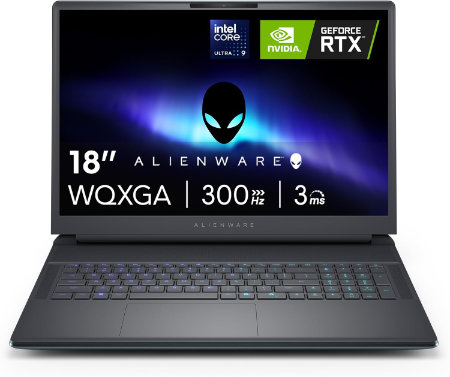
Dell Alienware 18 Area 51 Core Ultra 9 290HX Plus RTX5080 32GB 1TB WQXGA 300Hz |
|
|---|---|
 Check This On Amazon |
|
| CPU | Intel Core Ultra 9 290HX Plus, 24 cores, up to 5.5 GHz |
| GPU | NVIDIA GeForce RTX 5080 Laptop GPU, 16GB GDDR7 |
| Display Size | 18 inch, 16:10 |
| Display Resolution | 18 inch WQXGA 2560 × 1600, 300Hz, 500 nits, 100% DCI P3, Advanced Optimus, ComfortView Plus and G SYNC |
| RAM | 32GB DDR5 6400 MT/s, 2 × 16GB CSoDIMM |
| Storage Space | 1TB M.2 2230 PCIe Gen 4 ×4 TLC SSD |
| Operating System | Windows 11 Home or Windows 11 Pro |
| Ports | USB A 3.2 Gen 1; USB C Thunderbolt ports depending on GPU tier; HDMI 2.1; SD card reader; global headset jack; RJ45 Ethernet |
| Dimensions (L x W x H) | 16.14 × 12.59 × 0.95 inches at front (width × depth × front height) |
| Weight | 9.56 lb maximum system weight |
| Pros | Very large 300Hz screen; flagship RTX 50 Series GPU options; 96Wh battery; replaceable DDR5 memory and multiple SSD options. NVIDIA GeForce RTX 5080 Laptop GPU, 16GB GDDR7 is suited to high resolution gaming, streaming and GPU accelerated creation. |
| Cons | |
Dell Alienware 16 Area 51 Core Ultra 9 290HX Plus RTX5080 32GB 1TB OLED 240Hz |
|
|---|---|
Check This On Amazon |
|
| CPU | Intel Core Ultra 9 290HX Plus, 24 cores, up to 5.5 GHz |
| GPU | NVIDIA GeForce RTX 5080 Laptop GPU, 16GB GDDR7 |
| Display Size | 16 inch, 16:10 |
| Display Resolution | 16 inch WQXGA 2560 × 1600 anti glare OLED, 240Hz, 120% DCI P3 color volume, 620 nits HDR, G SYNC |
| RAM | 32GB DDR5 6400 MT/s, 2 × 16GB CSoDIMM |
| Storage Space | 1TB M.2 2230 PCIe Gen 4 ×4 TLC SSD |
| Operating System | Windows 11 Home or Windows 11 Pro |
| Ports | Global headset jack; 3 × USB A 3.2 Gen 1; 2 × Thunderbolt 4 for RTX 5070 and lower or 2 × Thunderbolt 5 for RTX 5070 Ti and higher; HDMI 2.1; SD card reader |
| Dimensions (L x W x H) | 14.37 × 11.41 × up to 1.12 inches (width × depth × maximum height) |
| Weight | 7.49 lb maximum system weight |
| Pros | Desktop class graphics options; high refresh OLED; 96Wh battery; user replaceable DDR5 memory and multiple SSD capacity options. NVIDIA GeForce RTX 5080 Laptop GPU, 16GB GDDR7 makes this suitable for high end gaming and demanding GPU work. |
| Cons | Very heavy for daily travel; large power adapter; high GPU tiers draw substantial power and create heat under sustained gaming. |
Dell Alienware 18 Area 51 Core Ultra 9 290HX Plus RTX5070Ti 32GB 1TB WQXGA 300Hz |
|
|---|---|
Check This On Amazon |
|
| CPU | Intel Core Ultra 9 290HX Plus, 24 cores, up to 5.5 GHz |
| GPU | NVIDIA GeForce RTX 5070 Ti Laptop GPU, 12GB GDDR7 |
| Display Size | 18 inch, 16:10 |
| Display Resolution | 18 inch WQXGA 2560 × 1600, 300Hz, 500 nits, 100% DCI P3, Advanced Optimus, ComfortView Plus and G SYNC |
| RAM | 32GB DDR5 6400 MT/s, 2 × 16GB CSoDIMM |
| Storage Space | 1TB M.2 2230 PCIe Gen 4 ×4 TLC SSD |
| Operating System | Windows 11 Home or Windows 11 Pro |
| Ports | USB A 3.2 Gen 1; USB C Thunderbolt ports depending on GPU tier; HDMI 2.1; SD card reader; global headset jack; RJ45 Ethernet |
| Dimensions (L x W x H) | 16.14 × 12.59 × 0.95 inches at front (width × depth × front height) |
| Weight | 9.56 lb maximum system weight |
| Pros | Very large 300Hz screen; flagship RTX 50 Series GPU options; 96Wh battery; replaceable DDR5 memory and multiple SSD options |
| Cons | 9.56 lb maximum laptop weight plus a 2.20 lb power adapter; large desk focused chassis; battery life is short during gaming |
Best High Performance Laptops for Revit Workstations
Dell Alienware 18 Area 51 Core Ultra 9 290HX Plus RTX5090 64GB 2TB WQXGA 300Hz |
|
|---|---|
Check This On Amazon |
|
| CPU | Intel Core Ultra 9 290HX Plus, 24 cores, up to 5.5 GHz |
| GPU | NVIDIA GeForce RTX 5090 Laptop GPU, 24GB GDDR7 |
| Display Size | 18 inch, 16:10 |
| Display Resolution | 18 inch WQXGA 2560 × 1600, 300Hz, 500 nits, 100% DCI P3, Advanced Optimus, ComfortView Plus and G SYNC |
| RAM | 64GB DDR5 6400 MT/s, 2 × 32GB CSoDIMM |
| Storage Space | 2TB M.2 2280 PCIe Gen 5 SSD |
| Operating System | Windows 11 Home or Windows 11 Pro |
| Ports | USB A 3.2 Gen 1; USB C Thunderbolt ports depending on GPU tier; HDMI 2.1; SD card reader; global headset jack; RJ45 Ethernet |
| Dimensions (L x W x H) | 16.14 × 12.59 × 0.95 inches at front (width × depth × front height) |
| Weight | 9.56 lb maximum system weight |
| Pros | Very large 300Hz screen; flagship RTX 50 Series GPU options; 96Wh battery; replaceable DDR5 memory and multiple SSD options. |
| Cons | 9.56 lb maximum laptop weight plus a 2.20 lb power adapter; large desk focused chassis; battery life is short during gaming. Consider a RAM upgrade for demanding video work or large local development environments. |
Dell Alienware 16 Area 51 Core Ultra 9 290HX Plus RTX5090 64GB 2TB OLED 240Hz |
|
|---|---|
Check This On Amazon |
|
| CPU | Intel Core Ultra 9 290HX Plus, 24 cores, up to 5.5 GHz |
| GPU | NVIDIA GeForce RTX 5090 Laptop GPU, 24GB GDDR7 |
| Display Size | 16 inch, 16:10 |
| Display Resolution | 16 inch WQXGA 2560 × 1600 anti glare OLED, 240Hz, 120% DCI P3 color volume, 620 nits HDR, G SYNC |
| RAM | 64GB DDR5 6400 MT/s, 2 × 32GB CSoDIMM |
| Storage Space | 2TB M.2 2280 PCIe Gen 5 SSD |
| Operating System | Windows 11 Home or Windows 11 Pro |
| Ports | Global headset jack; 3 × USB A 3.2 Gen 1; 2 × Thunderbolt 4 for RTX 5070 and lower or 2 × Thunderbolt 5 for RTX 5070 Ti and higher; HDMI 2.1; SD card reader |
| Dimensions (L x W x H) | 14.37 × 11.41 × up to 1.12 inches (width × depth × maximum height) |
| Weight | 7.49 lb maximum system weight |
| Pros | Desktop class graphics options; high refresh OLED; 96Wh battery; user replaceable DDR5 memory and multiple SSD capacity options |
| Cons | Very heavy for daily travel |
Dell Alienware 18 Area 51 Core Ultra 9 290HX Plus RTX5090 32GB 1TB WQXGA 300Hz |
|
|---|---|
Check This On Amazon |
|
| CPU | Intel Core Ultra 9 290HX Plus, 24 cores, up to 5.5 GHz |
| GPU | NVIDIA GeForce RTX 5090 Laptop GPU, 24GB GDDR7 |
| Display Size | 18 inch, 16:10 |
| Display Resolution | 18 inch WQXGA 2560 × 1600, 300Hz, 500 nits, 100% DCI P3, Advanced Optimus, ComfortView Plus and G SYNC |
| RAM | 32GB DDR5 6400 MT/s, 2 × 16GB CSoDIMM |
| Storage Space | 1TB M.2 2230 PCIe Gen 4 ×4 TLC SSD |
| Operating System | Windows 11 Home or Windows 11 Pro |
| Ports | USB A 3.2 Gen 1; USB C Thunderbolt ports depending on GPU tier; HDMI 2.1; SD card reader; global headset jack; RJ45 Ethernet |
| Dimensions (L x W x H) | 16.14 × 12.59 × 0.95 inches at front (width × depth × front height) |
| Weight | 9.56 lb maximum system weight |
| Pros | Very large 300Hz screen; flagship RTX 50 Series GPU options; 96Wh battery; replaceable DDR5 memory and multiple SSD options |
| Cons | |