
ArchiCAD is a powerful Building Information Modeling (BIM) tool that lets architects and designers develop detailed architectural models, collaborate in real time, and generate construction-ready documentation—all in a unified 3D environment. It’s as much a design studio as it is a technical command center. But to fully leverage Archicad’s capabilities—from concept modeling to photo-realistic rendering—you need a laptop built for design accuracy, modeling speed, and architectural scalability.
We created this guide for you—architects, architectural students, BIM managers, and design professionals who rely on Archicad for parametric design, collaborative documentation, and high-fidelity visualization. If you’re handling complex building models, coordinating with structural engineers, or presenting high-resolution renderings to clients, your laptop must be as robust and detail-oriented.
We’ve analyzed the real-world demands of Archicad workflows, from 2D drafting and 3D modeling to BIM coordination and rendering, to help you select the laptop that keeps up with your pace of creation.
Let’s break down the essential specs that shape Archicad performance:
Processor (CPU) is the cornerstone. Archicad is largely single-thread optimized, especially for general modeling, navigation, and 2D drafting. You’ll benefit most from high clock-speed CPUs, such as the Intel Core i7/i9 (13th/14th Gen H/HX), AMD Ryzen 9 HX series, or Apple M3 Pro/Max. These deliver fast regeneration times, smooth model navigation, and snappy viewport responsiveness.
GPU matters when you’re working in 3D viewports, CineRender visualizations, or external render engines like Twinmotion or Lumion. While Archicad doesn’t depend on the GPU as much as some VFX or game design software, having a dedicated graphics card greatly improves 3D modeling performance and enables smoother walkthroughs. We recommend at least an NVIDIA RTX 4060 or better (4070/4080 for intensive visualization tasks), or the Apple M3/M4 Max with high-core GPU support.
RAM impacts how easily you can work with large projects or switch between views and layouts. For most architectural workflows, 32GB of RAM is the smart starting point. 64GB is ideal for large-scale BIM projects, detailed site contexts, or when running multiple design apps simultaneously.
Storage needs to be fast and spacious. Load times, file imports, Teamwork syncing, and rendering caches benefit from PCIe Gen 4 NVMe SSDs. We recommend at least 1TB of SSD storage, ensuring you can store models, texture libraries, linked PDFs, and BIM cloud data with room to spare.
Display is not just about size, it’s about clarity and accuracy. Architectural work demands precision visuals for detailing, color consistency for render previews, and high resolution for layouts. A 15.6” or 16” QHD+ or 4K display, with 100% sRGB or DCI-P3 coverage, ensures you see your designs the way they’ll be built and presented. For professionals presenting to clients, HDR or Mini LED displays add an edge in visual storytelling.
Build Quality and Portability matter too. Architects move between office, site, and client presentations. Look for laptops with aluminum or magnesium alloy chassis, long battery life, and under 2.5kg weight for practical mobility without sacrificing performance.
Cooling and thermal efficiency aren’t optional. Long modeling sessions and rendering batches tax your system. We favor laptops with vapor chamber cooling, dual fan setups, and intelligent heat zoning, so your laptop stays responsive during extended work sessions.
Connectivity completes the picture. You’re interfacing with external monitors, USB-C peripherals, SD cards for site photos, BIMcloud, or laser scan data. Essential ports include Thunderbolt 4, USB-C with DisplayPort, HDMI 2.1, full-size SD card readers, and Wi-Fi 6E for cloud-based collaboration and model syncing.
This guide is tailored for a wide range of users: licensed architects, design-build professionals, interior designers using Archicad’s features, and architecture students for early-stage concept modeling, documentation, or client-side rendering.
Also take a look at the best laptops for Architecture Students in addition to the best laptops for Lumion.
Best 2026 Laptops for Archicad:
Contents
- MSI Cyborg Gaming Laptop 2023 Newest, 15.6 IPS FHD 144Hz Display, 13th Gen Intel Core i7-13620H Processor, NVIDIA GeForce RTX 4050
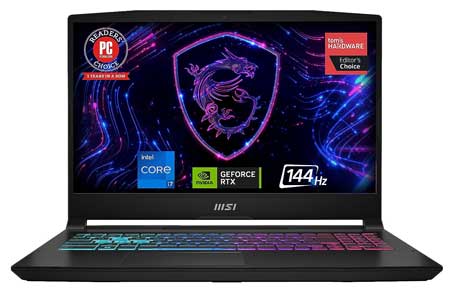
- MSI Katana 15 15.6 144Hz FHD Gaming Laptop 13th Gen Intel Core i7, RTX 4070
- ASUS ProArt StudioBook Pro 16 OLED Laptop, 16” 3840x2400 OLED Display, AMD Ryzen 9 5900HX, 32GB DDR4, 2TB PCIe SSD, Nvidia RTX A2000
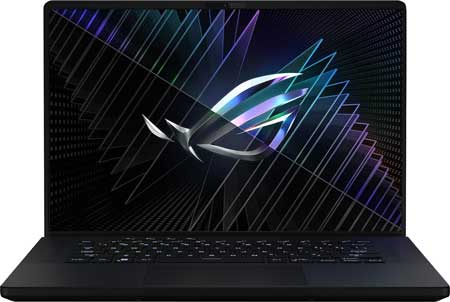
- ASUS Flagship ROG Zephyrus M16 Gaming Laptop 16 QHD+ IPS 240Hz 13th Gen Intel 14-core i9-13900H
- ASUS ROG Strix G16 (2023) Gaming Laptop, 16” 1610 FHD 165Hz, GeForce RTX 4060, Intel Core i7-13650HX
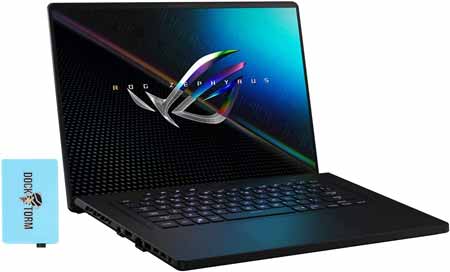
- ASUS ROG 16 WQXGA (2560x1600) 165Hz IPS Display Gaming Laptop (Intel i9-11900H 8-Core, 16GB RAM, 1TB SSD, RTX 3060
- HP OMEN - 16.1 Micro-Edge QHD 2K 165Hz Gaming Laptop - Intel Core i7 11800H - B&O - NVIDIA GeForce RTX 3070 - 16GB Memory 1TB SSD
- ASUS ProArt StudioBook 16 OLED Laptop, 16” 3840x2400 OLED Display, Intel core i7, 32GB DDR4, 1TB PCIe SSD, Nvidia Geforce RTX 3060
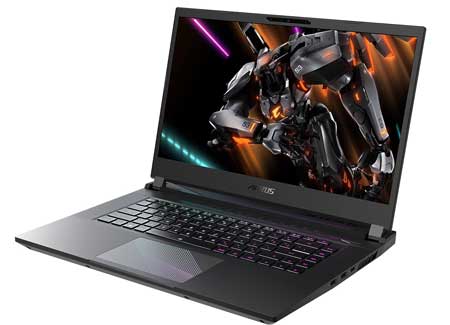
- Gigabyte AORUS 15 15.6 169 Thin Bezel QHD 2560x1440 165Hz, NVIDIA GeForce RTX 4060 Laptop
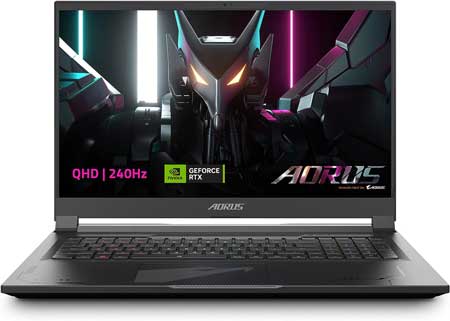
- GIGABYTE AORUS 17X 17.3 Thin Bezel QHD 2560x1440 240Hz Display, NVIDIA GeForce RTX 4080
- HP Omen 16 Gaming Laptop I 16.1” Full HD IPS 144Hz 7ms I 11th Gen Intel 8-Core i7-11800H I 64GB DDR4 1TB SSD I Geforce RTX 3060 6GB
- Alienware M15 R6 Gaming Laptop - 15.6-inch FHD (1920 x 1080) 1ms 360Hz Display, Core i7-11800H, 32GB DDR4 RAM, 1TB SSD, NVIDIA RTX 3070 8GB Graphics
- HP OMEN 17t 17.3 240Hz 2K QHD IPS Gaming Laptop 13th Gen (Intel i9-13900HX 24-Core, 64GB DDR5
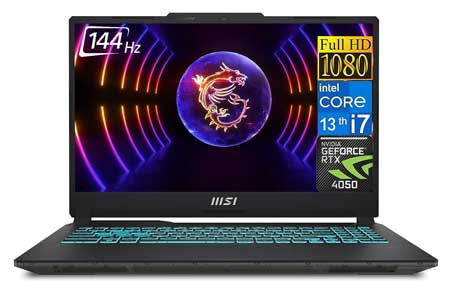
MSI Cyborg Gaming Laptop 2023 Newest, 15.6 IPS FHD 144Hz Display, 13th Gen Intel Core i7-13620H Processor, NVIDIA GeForce RTX 4050 |
|
|---|---|
 Check This On Amazon |
|
| CPU | 13th Gen Intel Core i7-13620H |
| GPU | NVIDIA GeForce RTX 4050 |
| Display Size | 15.6 inches |
| Display Resolution | 1920 x 1080 |
| RAM | 16GB DDR5 |
| Storage Space | 1TB SSD |
| Operating System | Windows 11 |
| Ports | HDMI, Ethernet, Audio |
| Dimensions (L x W x H) | 14.15 x 0.9 x 9.86 inches |
| Weight | 6.67 lbs |
| Advantages | Performance, Good price, Quality build |
| Disadvantages | N/A |
MSI Katana 15 15.6 144Hz FHD Gaming Laptop 13th Gen Intel Core i7, RTX 4070 |
|
|---|---|
 Check This On Amazon |
|
| CPU | 13th Gen Intel Core i7 |
| GPU | RTX 4070 |
| Display Size | 15.6" |
| Display Resolution | 1920 x 1080 pixels |
| RAM | 16GB DDR5 |
| Storage Space | 1TB SSD |
| Operating System | Windows 11 |
| Ports | USB, Ethernet, Audio, HDMI |
| Dimensions (L x W x H) | 14.13 x 10.2 x 0.98 inches |
| Weight | 8.85 pounds |
| Advantages | Affordable, Good performance |
| Disadvantages | Heavy |
ASUS ProArt StudioBook Pro 16 OLED Laptop, 16” 3840x2400 OLED Display, AMD Ryzen 9 5900HX, 32GB DDR4, 2TB PCIe SSD, Nvidia RTX A2000 |
|
|---|---|
 Check This On Amazon |
|
| CPU | AMD Ryzen 9 5900HX |
| GPU | Nvidia RTX A2000 |
| Display Size | 16” |
| Display Resolution | 3840x2400 OLED Display |
| RAM | 32GB DDR4 |
| Storage Space | 2TB PCIe SSD |
| Operating System | Windows 11 |
| Ports | USB, Audio Jack, HDMI, Ethernet |
| Dimensions (L x W x H) | 14.25 x 10.39 x 0.78 inches |
| Weight | 10.3 pounds |
| Advantages | Quality display with good performance |
| Disadvantages | Very heavy |
ASUS Flagship ROG Zephyrus M16 Gaming Laptop 16 QHD+ IPS 240Hz 13th Gen Intel 14-core i9-13900H |
|
|---|---|
 Check This On Amazon |
|
| CPU | 13th Gen Intel 14-core i9-13900H Processor |
| GPU | NVIDIA GeForce RTX 4070 8GB |
| Display Size | 16" QHD+ |
| Display Resolution | (2560x1600) IPS |
| RAM | 32GB DDR5 SDRAM |
| Storage Space | 1TB Solid State Drive |
| Operating System | Windows 11 |
| Ports | 1 x Thunderbolt 4, 1 x USB-C 3.2, 2 x USB-A 3.2, 1 x HDMI 2.1 FRL, 1 x 3.5mm Combo Audio Jack |
| Dimensions (L x W x H) | 9.69 x 13.98 x 0.88 inches |
| Weight | 4.64 pounds |
| Advantages | Lightweight, Good performance, Quality Display |
| Disadvantages | Price |
ASUS ROG Strix G16 (2023) Gaming Laptop, 16” 1610 FHD 165Hz, GeForce RTX 4060, Intel Core i7-13650HX |
|
|---|---|
 Check This On Amazon |
|
| CPU | 4.9 GHz core_i7 |
| GPU | NVIDIA GeForce RTX 4060 |
| Display Size | 16 Inches |
| Display Resolution | 1920 x 1200 pixels |
| RAM | 16 GB DDR5 |
| Storage Space | 512 GB SSD |
| Operating System | Windows 11 |
| Ports | USB, Ethernet, Audio |
| Dimensions (L x W x H) | 13.94 x 0.89 x 10.39 inches |
| Weight | 5.51 pounds |
| Advantages | Good performance |
| Disadvantages | Storage space may be inadequate for some people |
ASUS ROG 16 WQXGA (2560x1600) 165Hz IPS Display Gaming Laptop (Intel i9-11900H 8-Core, 16GB RAM, 1TB SSD, RTX 3060 |
|
|---|---|
 Check This On Amazon |
|
| CPU | Intel i9-11900H 8-Core, |
| GPU | RTX 3060 |
| Display Size | 16" |
| Display Resolution | WQXGA (2560x1600) 165Hz IPS |
| RAM | 16GB |
| Storage Space | 1TB SSD |
| Operating System | Windows 11 |
| Ports | USB, Ethernet, Audio, HDMI |
| Dimensions (L x W x H) | 9.7 x 14 x 0.9 inches |
| Weight | 4.5 pounds |
| Advantages | Good performance |
| Disadvantages | n/a |
HP OMEN - 16.1 Micro-Edge QHD 2K 165Hz Gaming Laptop - Intel Core i7 11800H - B&O - NVIDIA GeForce RTX 3070 - 16GB Memory 1TB SSD |
|
|---|---|
 Check This On Amazon |
|
| CPU | Intel Core I7 11800H Processor (2.30 Ghz, Up To 4.60 Ghz Max Boost, 8 Cores, 16 Threads, 24 Mb Cache ) |
| GPU | Nvidia Geforce Rtx 3070 |
| Display Size | 16.1'' |
| Display Resolution | Qhd (2560 X 1440) Led-Backlit Ips Display With 165Hz Refresh Rate | 3Ms Overdrive Response Time | 100% Srgb | 16:9 Aspect Ratio | Dc Dimming |
| RAM | 16GB |
| Storage Space | 1TB SSD |
| Operating System | Windows 11 |
| Ports | USB, Audio, Ethernet, HDMI |
| Dimensions (L x W x H) | 14.54 x 9.76 x 0.91 inches |
| Weight | 5.11 lbs |
| Advantages | Quality display, Good design and build quality |
| Disadvantages | Price |
ASUS ProArt StudioBook 16 OLED Laptop, 16” 3840x2400 OLED Display, Intel core i7, 32GB DDR4, 1TB PCIe SSD, Nvidia Geforce RTX 3060 |
|
|---|---|
 Check This On Amazon |
|
| CPU | Intel core i7-11800H processor 2.4GHz(24M Cache, up to 4.6GHz) |
| GPU | NVIDIA Geforce RTX 3060 with 6GB GDDR6 VRAM |
| Display Size | 16” |
| Display Resolution | 3840x2400 OLED Display |
| RAM | 32GB DDR4 |
| Storage Space | 1TB PCIe SSD |
| Operating System | Windows 11 |
| Ports | USB, Ethernet, Audio, HDMI |
| Dimensions (L x W x H) | 14.25 x 10.39 x 0.78 inches |
| Weight | 10.40 lbs |
| Advantages | Performance, Display |
| Disadvantages | None |
Gigabyte AORUS 15 15.6 169 Thin Bezel QHD 2560x1440 165Hz, NVIDIA GeForce RTX 4060 Laptop |
|
|---|---|
 Check This On Amazon |
|
| CPU | Intel Core i7-13700H |
| GPU | NVIDIA GeForce RTX 4060 Laptop GPU 8GB GDDR6 |
| Display Size | 15.6 inches |
| Display Resolution | QHD 2560x1440 |
| RAM | 16GB DDR5 |
| Storage Space | 1TB SSD |
| Operating System | Windows 11 |
| Ports | 1x Thunderbolt 4 (Supports Power Delivery), 1x HDMI 2.1, 1x Mini DP 1.4, 3x USB 3.2 Gen1 (Type-A), 1x RJ45, 1x Audio Combo Jack, 1x SD Card Reader, 1x DC In |
| Dimensions (L x W x H) | 14.2 x 10.7 x 0.82 inches |
| Weight | 4.96 pounds |
| Advantages | Very good performance, Quality display |
| Disadvantages | Heavy for some people |
GIGABYTE AORUS 17X 17.3 Thin Bezel QHD 2560x1440 240Hz Display, NVIDIA GeForce RTX 4080 |
|
|---|---|
 Check This On Amazon |
|
| CPU | Intel Core i9-13900HX |
| GPU | NVIDIA GeForce RTX 4080 Laptop GPU 12GB GDDR6 |
| Display Size | 17.3" |
| Display Resolution | QHD 2560x1440 |
| RAM | 16GB DDR5 |
| Storage Space | 1TB SSD |
| Operating System | Window 11 |
| Ports | 1x Thunderbolt 4 (Supports Power Delivery), 1x HDMI 2.1, 1x Mini DP 1.4 (120Hz), 3x USB 3.2 Gen2 (Type-A), 1x RJ45, 1x Audio Combo Jack, 1x DC In |
| Dimensions (L x W x H) | 15.6 x 11.5 x 0.86 inches |
| Weight | 6.17 pounds |
| Advantages | Performance |
| Disadvantages | Pricy for some people |
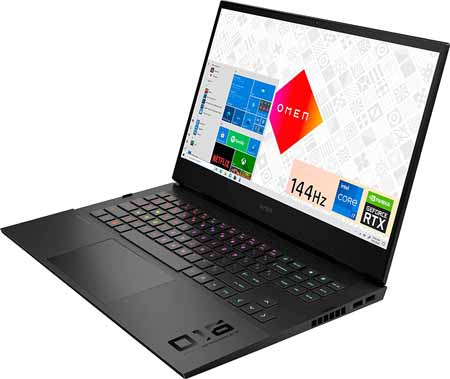
HP Omen 16 Gaming Laptop I 16.1” Full HD IPS 144Hz 7ms I 11th Gen Intel 8-Core i7-11800H I 64GB DDR4 1TB SSD I Geforce RTX 3060 6GB |
|
|---|---|
 Check This On Amazon |
|
| CPU | 11th Gen Intel 8-Core i7-11800H |
| GPU | RTX 3060 6GB |
| Display Size | 16.1” |
| Display Resolution | 1920 x 1080 pixels |
| RAM | 64GB DDR4 |
| Storage Space | 1 TB SSD |
| Operating System | Windows 11 |
| Ports | 1 x Thunderbolt 4 - USB4 Type-C (40Gbps signaling rate, DisplayPort 1.4, HP Sleep and Charge), 3 x SuperSpeed USB-A (5Gbps signaling rate, One with HP Sleep and Charge), 1 x Mini DisplayPort, 1 x HDMI 2.1, 1 x Ethernet RJ45, 1 x Headphone/microphone combo, 1 x Multi-format SD media card reader |
| Dimensions (L x W x H) | 9.76 x 14.54 x 0.91 inches |
| Weight | 5.1 pounds |
| Advantages | Good performance, Good display quality |
| Disadvantages | n/a |
Alienware M15 R6 Gaming Laptop - 15.6-inch FHD (1920 x 1080) 1ms 360Hz Display, Core i7-11800H, 32GB DDR4 RAM, 1TB SSD, NVIDIA RTX 3070 8GB Graphics |
|
|---|---|
 Check This On Amazon |
|
| CPU | 11th Generation Intel Core i7-11800H (24MB Cache, up to 4.6 GHz, 8 cores) Processor |
| GPU | NVIDIA GeForce RTX 3070 8GB GDDR6 Graphics |
| Display Size | 15.6 inches |
| Display Resolution | FHD (1920 x 1080) 1ms 360Hz |
| RAM | 32GB DDR4 |
| Storage Space | 1TB SSD |
| Operating System | Windows 11 |
| Ports | 1. (2) Type-A USB 3.2 Gen1 ports| 2. Type-C port(Thunderbolt 4, USB 3.2 Gen 2, Display Port 1.4, Power Delivery 15W Output (5V/3A) capabilities) | 3. Type-A USB 3.2 Gen 1 port | 4. HDMI 2.1 Output port | 5. Power/DC-In port | 6. Killer E2600 1Gbps rated RJ-45 Ethernet port | 7. Global Headset jack |
| Dimensions (L x W x H) | 10.73 x 14.02 x 0.89 inches |
| Weight | 5.93 pounds |
| Advantages | Great display, Good graphics card |
| Disadvantages | Might be heavy for some people |
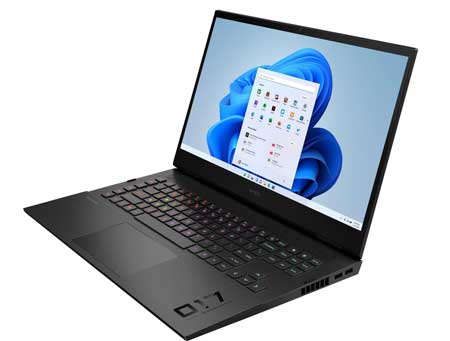
HP OMEN 17t 17.3 240Hz 2K QHD IPS Gaming Laptop 13th Gen (Intel i9-13900HX 24-Core, 64GB DDR5 |
|
|---|---|
 Check This On Amazon |
|
| CPU | Intel i9-13900HX 24-Core |
| GPU | GeForce RTX 4090 16GB |
| Display Size | 17.3 inches |
| Display Resolution | Quad HD (2560x1440) |
| RAM | 64GB DDR5 |
| Storage Space | 2TB PCIe NVMe SSD |
| Operating System | Windows 11 |
| Ports | HDMI, Audio, Ethernet, USB |
| Dimensions (L x W x H) | 10.32 x 15.65 x 1.5 inches |
| Weight | 6.2 pounds |
| Advantages | Very good performance, Good display, Large storage |
| Disadvantages | Might be heavy for some people |