
We build this guide to help you choose the best Microsoft Surface tablets. We target you if you prefer Windows environments, want laptop-class apps in a tablet form, or need strong pen/keyboard support. Surface line appeals to creatives, business users, students, hybrid workers, or anyone who wants portability without losing productivity.
Many people pick a windows device and later feel limited by RAM, compromise on display refresh, suffer from battery issues, or find the accessory cost unexpectedly high. You might also struggle when the Surface lacks ports or the screen-ratio makes some tasks harder. These frustrations slow you down and reduce the joy of using a premium device.
The challenge lies in balancing performance, input flexibility, battery life, display quality, and ecosystem integration. Some Surface models focus on ultra-thin design but trade off cooling or speaker power; others are powerful but heavy or pricey. Without clear priorities you may end up with a device that underdelivers where it matters most for you.
We propose a solution: use criteria tailored specifically to the Surface line’s strengths and weaknesses. Know what features matter, know the minimum specs you should demand, so you choose a model that works for your workflow and lifestyle.
Here are the key criteria we assess for Surface tablets, with minimum specifications you should expect:
Display & Refresh Rate. Surfaces are often used for document work, drawing, video, or multitasking. A high-resolution screen with good color accuracy makes reading or sketching easier. A higher refresh rate (e.g. 120 Hz) gives smooth scrolling, pen input, and fluid motion. Minimum: at least Full HD resolution, ideally PixelSense display in Surface’s familiar aspect (3:2 or similar), brightness enough for mixed lighting (400-500 nits helps).
Processor & Performance. Surface tablets run full Windows; they must run desktop applications, browser tabs, design tools etc. Choose recent generation Intel Core (or equivalent ARM / Snapdragon where Surface uses them) chips. Minimum: a CPU that handles multitasking; don’t settle for base Pentium models if you expect to do anything heavy.
RAM & Multitasking. Surface line is often used with many open windows, browser tabs, maybe virtual meetings, design tools, etc. Minimum 8 GB RAM for light to moderate use; 16 GB or more if you do creative work, design, virtual machines, or heavy multitasking.
Storage & Type. Storage must be fast SSD/NVMe class. Capacity large enough to hold OS, apps, files, 128 GB or 256 GB as base; 512 GB or 1 TB if you store lots of media or do video/photo editing. Some Surface models offer removable SSD slots which helps future proofing.
Battery Life & Thermal Design. Your Surface should last through work sessions, travel or class time. A design that keeps cool under pressure avoids throttling. Minimum: battery life of at least 7-10 hours under mixed use.
Connectivity & Ports. USB-C / Thunderbolt (on recent models) for fast data transfer, external displays. Surface Connect port for docking. WiFi (preferably WiFi 6 / 6E), Bluetooth. Optional LTE/5G is a bonus. If you present or extend display, port choices matter.
Pen / Stylus & Accessories. Surface Slim Pen support, keyboard (Type Cover) availability, responsive touch are big advantages. Low latency, good pressure sensitivity matter if you draw or annotate. Accessories ideally should be easy to attach/detach, reliable.
Build Quality & Weight. Since Surface line often includes detachable 2-in-1 style, weight in tablet form matters; also ruggedness, hinge or kickstand quality. A well-built body, good joints, no wobble during use.
Software / OS & Update Support. Windows version, driver support, firmware updates, security patches. Also software support for tablet / touch / pen input. Compatibility with apps you use.
We’ll now look at the actual Surface models that meet or exceed these criteria. You will see comparisons showing how they handle productivity, pen input, media, portability, battery life, and value. These will help you pick the Surface tablet that fits your needs and budget.
2027 Best Microsoft Surface Tablets:
Contents
- Microsoft Surface Pro 12-inch 2025 16GB 512GB
- Microsoft Surface Pro 13-inch 2026 Snapdragon X2 Elite 32GB 1TB
- Microsoft Surface Pro 13-inch 2026 Snapdragon X2 Plus 16GB 256GB
- Microsoft Surface Pro for Business 11th Edition Intel 2025 16GB 256GB
- Microsoft Surface Pro for Business 11th Edition Intel 2025 32GB 512GB
- Microsoft Surface Pro for Business 12th Edition Intel 2026 16GB 256GB
- Microsoft Surface Pro for Business 12th Edition Intel 2026 32GB 512GB
- Microsoft Surface Pro 12-inch 2nd Edition 2026 16GB 256GB
- Microsoft Surface Pro 12-inch 2nd Edition 2026 24GB 512GB
- Microsoft Surface Pro 12-inch 2025 16GB 256GB
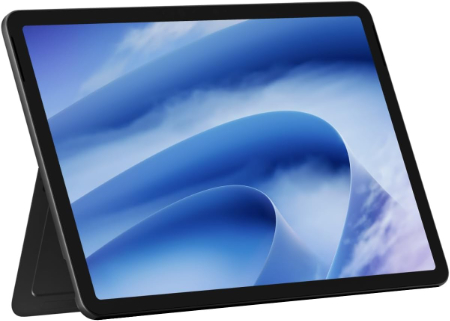
Microsoft Surface Pro 12-inch 2025 16GB 512GB |
|
|---|---|
 Check This On Amazon |
|
| Operating System | Windows 11 Home |
| Screen Size | 12 inches |
| Display Resolution | 2880 × 1920, PixelSense LCD, 90Hz |
| Processor | Qualcomm Snapdragon X Plus, 8 core |
| GPU | Qualcomm Adreno GPU |
| RAM | 16GB LPDDR5x |
| Storage Space | 512GB UFS |
| SD Card Expansion Slot | No |
| Main Camera | 10MP rear camera |
| Front Selfie Camera | Front facing Full HD camera |
| Battery Capacity | up to 16 hours local video playback |
| Connectivity | WiFi 7, Bluetooth 5.4, 2 × USB C / USB 3.2; WiFi model |
| Pros | Lightweight 686g body; 90Hz high resolution display; NPU for AI features; WiFi 7; detachable keyboard and pen support. |
| Cons | No microSD slot |
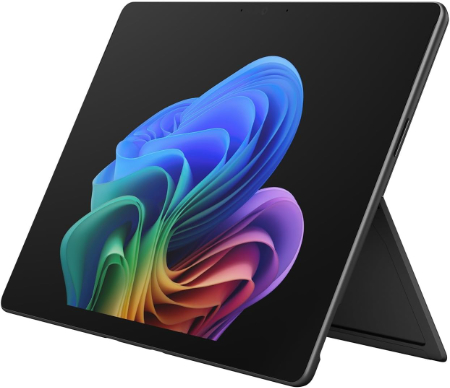
Microsoft Surface Pro 13-inch 2026 Snapdragon X2 Elite 32GB 1TB |
|
|---|---|
 Check This On Amazon |
|
| Operating System | Windows 11 Home |
| Screen Size | 13 inches |
| Display Resolution | 2880 × 1920, PixelSense OLED or LCD, up to 120Hz depending on configuration |
| Processor | Qualcomm Snapdragon X2 Elite, 12 core |
| GPU | Integrated Qualcomm Adreno GPU |
| RAM | 32GB LPDDR5x |
| Storage Space | 1TB SSD |
| SD Card Expansion Slot | No |
| Main Camera | 10MP Ultra HD rear camera |
| Front Selfie Camera | Front facing camera with Windows Hello facial recognition |
| Battery Capacity | up to 15.5 hours local video playback, configuration dependent |
| Connectivity | WiFi 7, Bluetooth; 2 × USB C / USB4 and Surface Connect; cellular depends on SKU |
| Pros | High end Snapdragon X2 Elite processor; 32GB RAM and 1TB storage; high resolution 120Hz display option; USB4; detachable keyboard. |
| Cons | High purchase price; keyboard and pen may be extra |
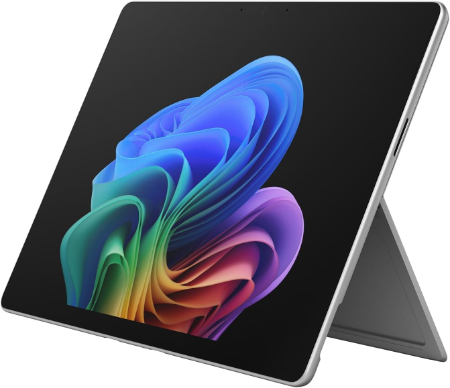
Microsoft Surface Pro 13-inch 2026 Snapdragon X2 Plus 16GB 256GB |
|
|---|---|
 Check This On Amazon |
|
| Operating System | Windows 11 Home |
| Screen Size | 13 inches |
| Display Resolution | 2880 × 1920, PixelSense OLED or LCD, up to 120Hz depending on configuration |
| Processor | Qualcomm Snapdragon X2 Plus, 10 core |
| GPU | Integrated Qualcomm Adreno GPU |
| RAM | 16GB LPDDR5x |
| Storage Space | 256GB SSD |
| SD Card Expansion Slot | No |
| Main Camera | 10MP Ultra HD rear camera |
| Front Selfie Camera | Front facing camera with Windows Hello facial recognition |
| Battery Capacity | up to 15.5 hours local video playback |
| Connectivity | WiFi 7, Bluetooth; 2 × USB C / USB4 and Surface Connect; cellular depends on SKU |
| Pros | New Snapdragon X2 platform; high resolution 120Hz display option; detachable keyboard; Windows Hello; USB4; on device AI acceleration. |
| Cons | Premium pricing; keyboard and pen may be extra; OLED or LCD depends on configuration; ARM app compatibility should be checked for specialist software. |
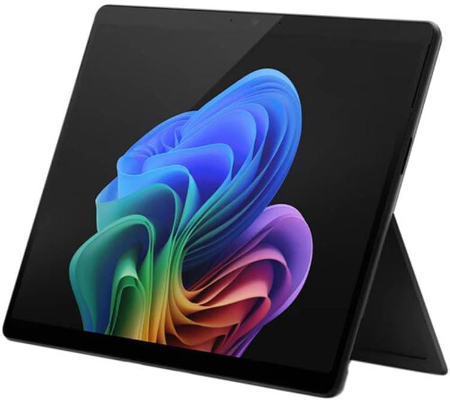
Microsoft Surface Pro for Business 11th Edition Intel 2025 16GB 256GB |
|
|---|---|
 Check This On Amazon |
|
| Operating System | Windows 11 Pro |
| Screen Size | 13 inches |
| Display Resolution | 2880 × 1920, PixelSense Flow touchscreen, up to 120Hz; panel depends on SKU |
| Processor | Intel Core Ultra 5 or Core Ultra 7 |
| GPU | Integrated Intel graphics, processor dependent |
| RAM | 16GB LPDDR5x |
| Storage Space | 256GB SSD |
| SD Card Expansion Slot | No |
| Main Camera | 10MP Ultra HD rear camera |
| Front Selfie Camera | 1440p Quad HD front camera with Windows Studio Effects |
| Battery Capacity | |
| Connectivity | WiFi and Bluetooth; USB C / Thunderbolt 4 and Surface Connect; cellular depends on SKU |
| Pros | Full Windows x86 application compatibility; premium 13 inch touchscreen; detachable keyboard and pen support; business security and management features. |
| Cons | Higher cost; keyboard and pen may be extra |
Microsoft Surface Pro for Business 11th Edition Intel 2025 32GB 512GB |
|
|---|---|
 Check This On Amazon |
|
| Operating System | Windows 11 Pro |
| Screen Size | 13 inches |
| Display Resolution | 2880 × 1920, PixelSense Flow touchscreen, up to 120Hz; panel depends on SKU |
| Processor | Intel Core Ultra 5 or Core Ultra 7, SKU dependent |
| GPU | Integrated Intel graphics, processor dependent |
| RAM | 32GB LPDDR5x |
| Storage Space | 512GB SSD |
| SD Card Expansion Slot | No |
| Main Camera | 10MP Ultra HD rear camera |
| Front Selfie Camera | 1440p Quad HD front camera with Windows Studio Effects |
| Battery Capacity | |
| Connectivity | WiFi and Bluetooth; USB C / Thunderbolt 4 and Surface Connect; cellular depends on SKU |
| Pros | 32GB RAM supports demanding multitasking; full Windows compatibility; premium touchscreen; business security and service options. |
| Cons | Expensive; keyboard and pen often extra |
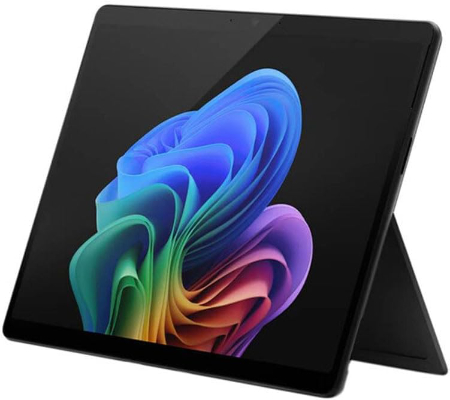
Microsoft Surface Pro for Business 12th Edition Intel 2026 16GB 256GB |
|
|---|---|
 Check This On Amazon |
|
| Operating System | Windows 11 Pro |
| Screen Size | 13 inches |
| Display Resolution | PixelSense touchscreen |
| Processor | Intel Core Ultra series |
| GPU | Integrated Intel graphics |
| RAM | 16GB LPDDR5x |
| Storage Space | 256GB SSD |
| SD Card Expansion Slot | No |
| Main Camera | 10MP rear camera, exact module varies by SKU |
| Front Selfie Camera | Front camera with Windows Hello facial recognition |
| Battery Capacity | |
| Connectivity | WiFi and Bluetooth; USB C / USB4 or Thunderbolt depending on SKU; Surface Connect; |
| Pros | Full Windows x86 compatibility; business security and management; detachable keyboard; premium touchscreen; designed for commercial deployment. |
| Cons | |
Microsoft Surface Pro for Business 12th Edition Intel 2026 32GB 512GB |
|
|---|---|
Check This On Amazon |
|
| Operating System | Windows 11 Pro |
| Screen Size | 13 inches |
| Display Resolution | PixelSense touchscreen |
| Processor | Intel Core Ultra series, exact processor depends on SKU |
| GPU | Integrated Intel graphics |
| RAM | 32GB LPDDR5x |
| Storage Space | 512GB SSD |
| SD Card Expansion Slot | No |
| Main Camera | 10MP rear camera, exact module varies by SKU |
| Front Selfie Camera | Front camera with Windows Hello facial recognition |
| Battery Capacity | |
| Connectivity | WiFi and Bluetooth; USB C / USB4 or Thunderbolt depending on SKU; Surface Connect; cellular is SKU dependent |
| Pros | 32GB RAM supports heavy multitasking; full Windows compatibility; business security features; detachable keyboard and pen support. |
| Cons | |
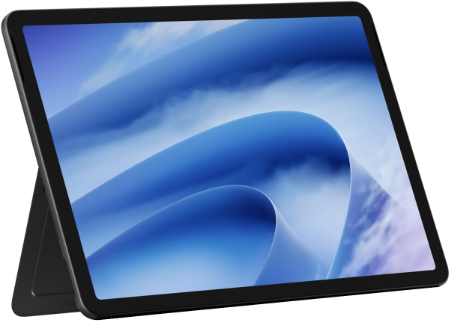
Microsoft Surface Pro 12-inch 2nd Edition 2026 16GB 256GB |
|
|---|---|
 Check This On Amazon |
|
| Operating System | Windows 11 Home |
| Screen Size | 12 inches |
| Display Resolution | 2196 × 1464, PixelSense LCD, 90Hz |
| Processor | Qualcomm Snapdragon X2 Plus, 6 core |
| GPU | Qualcomm Adreno GPU |
| RAM | 16GB LPDDR5x |
| Storage Space | 256GB UFS |
| SD Card Expansion Slot | No |
| Main Camera | 10MP Ultra HD rear camera |
| Front Selfie Camera | 1080p Full HD front camera |
| Battery Capacity | up to 15.5 hours local video playback |
| Connectivity | WiFi 7, Bluetooth; 2 × USB C / USB 3.2; WiFi model |
| Pros | Lightweight 686g design; Snapdragon X2 Plus; 80 TOPS NPU; WiFi 7; 90Hz touchscreen; compact tablet form. |
| Cons | No microSD slot |
Microsoft Surface Pro 12-inch 2nd Edition 2026 24GB 512GB |
|
|---|---|
 Check This On Amazon |
|
| Operating System | Windows 11 Home |
| Screen Size | 12 inches |
| Display Resolution | 2196 × 1464, PixelSense LCD, 90Hz |
| Processor | Qualcomm Snapdragon X2 Plus, 6 core |
| GPU | Qualcomm Adreno GPU |
| RAM | 24GB LPDDR5x |
| Storage Space | 512GB UFS |
| SD Card Expansion Slot | No |
| Main Camera | 10MP Ultra HD rear camera |
| Front Selfie Camera | 1080p Full HD front camera |
| Battery Capacity | up to 15.5 hours local video playback |
| Connectivity | WiFi 7, Bluetooth; 2 × USB C / USB 3.2; WiFi model |
| Pros | 24GB RAM for multitasking; compact 686g design; Snapdragon X2 Plus; 80 TOPS NPU; WiFi 7; 90Hz touchscreen. |
| Cons | No microSD slot; keyboard and pen may be extra; |
Microsoft Surface Pro 12-inch 2025 16GB 256GB |
|
|---|---|
Check This On Amazon |
|
| Operating System | Windows 11 Home |
| Screen Size | 12 inches |
| Display Resolution | 2880 × 1920, PixelSense LCD, 90Hz |
| Processor | Qualcomm Snapdragon X Plus, 8 core |
| GPU | Qualcomm Adreno GPU |
| RAM | 16GB LPDDR5x |
| Storage Space | 256GB UFS |
| SD Card Expansion Slot | No |
| Main Camera | 10MP rear camera |
| Front Selfie Camera | Front facing Full HD camera |
| Battery Capacity | up to 16 hours local video playback |
| Connectivity | WiFi 7, Bluetooth 5.4, 2 × USB C / USB 3.2; WiFi model |
| Pros | Lightweight 686g tablet; sharp 3:2 touchscreen; Snapdragon X Plus with 45 TOPS NPU; WiFi 7; detachable keyboard and pen support. |
| Cons | Keyboard and pen often sold separately |
You can also take a look at the Best Samsung Galaxy Tablets in addition to the Best Apple iPad Tablets.
MORE TABLET RECOMMENDATIONS YOU SHOULD BUY;
Latest Best Google Pixel Tablets
Top Latest Huawei Tablets to Buy