

If you’re a competitive gamer, digital content creator, real-time 3D developer, or enthusiast-level power user, this guide is crafted specifically for you. Alienware doesn’t build laptops for passive users. These systems are for people who expect desktop-class control in portable form, and who are willing to invest in machines that stay relevant across generations of gaming engines, rendering workflows, and performance standards.
But Alienware laptops also come with choices. A lot of them. From the x16 and x14 series to the ultra-performance m18 and m16 models, the naming conventions and variant codes—x16 R1, m18 R2, etc.—can get overwhelming. Each model boasts its own approach to cooling, GPU wattage, chassis material, screen fidelity, and software integration. So how do you choose? You’re in the right place—we’ll walk through everything.
The first major challenge: performance versus portability. The ultra-slim x14 and x16 models emphasize sleekness with a minimal thermal footprint, while the m16 and m18 deliver raw power, thicker chassis, and a platform for overclocking and expandability. You might be asking, “Do I need a vapor chamber system or is Cryo-Tech cooling enough?”, or “Will the 4080 in the x16 outperform a 4070 in the m16 given thermal constraints?” These aren’t just questions—they’re decision-points. And we’ll help you resolve them.
To earn a place in this article, every Alienware laptop must meet strict performance thresholds. We focus on models that include at least an Intel Core i7 HX-series CPU or AMD Ryzen 7 7845HX, 16GB DDR5 memory (upgradable), a 1TB Gen 4 NVMe SSD, and RTX 4060 GPU or higher. Every system we recommend supports hardware-accelerated ray tracing, AI-assisted performance scaling (via DLSS or FSR), and advanced display technology that matches high-refresh gaming or creative fidelity.
Let’s walk through the major product tiers.
The Alienware x16 is the poster child for premium portability. Its mechanical LED ring, anodized magnesium alloy body, and QHD+ 240Hz display combine elegance with competitive specs. Powered by Intel i9-13900HK or AMD Ryzen 9 options, and GPUs up to the RTX 4090 Laptop, the x16 is ideal for players who need something sleek—but still savage. You get Dolby Vision displays, Dolby Atmos-certified six-speaker setups, and a low-profile CherryMX keyboard that still feels like a desktop experience. It’s ideal for streamers, creative professionals, and eSports athletes who also value aesthetics.
The Alienware m16 and m18, by contrast, are cooling-first designs. These machines accommodate desktop-grade GPUs (up to 175W RTX 4090s) and HX-class CPUs with massive thermal headroom, supported by Element 31 thermal interface material, vapor chamber cooling, and quad-fan configurations. The m18, in particular, offers an 18-inch screen at QHD+ 165Hz with G-Sync, per-key AlienFX lighting, and dual memory + dual storage slots, making it the most expandable Alienware laptop in recent years.
The m16 delivers similar performance but in a slightly more mobile form. It suits those who game and render, or who want a mobile workstation without giving up cooling efficiency. It also introduces FHD 480Hz options, perfect for competitive FPS gamers, where refresh speed trumps resolution.
Displays across the Alienware family are elite. From QHD+ with ComfortView Plus and Dolby Vision to 480Hz panels with NVIDIA G-Sync and Advanced Optimus, these machines balance visual brilliance with pixel precision. Color calibration is factory-standard, and brightness levels reach up to 600 nits on flagship OLED options.
One of the defining features across Alienware laptops is Cryo-Tech thermal engineering. Every chassis is designed for heat dissipation without power throttling. Vapor chambers replace heat pipes in high-end models, Element 31 compound boosts thermal conductivity, and the internal fans are optimized for airflow without distracting pitch. It means sustained performance, even under rendering pressure or extended play.
Then there’s Command Center—Alienware’s suite of customization tools for power tuning, thermal profiles, per-game overclocking, macro programming, and lighting presets. It’s more than visual fluff. We’ve used it to push fan speeds, undervolt CPUs, and raise TGP limits—without ever entering the BIOS.
Across the board, expect Thunderbolt 4, HDMI 2.1, USB 3.2 Gen 2, SD card readers, RJ-45 Ethernet, and Wi-Fi 6E or 7 depending on the model. The ports are mostly rear-loaded, which clears side space for mouse and accessory freedom—a thoughtful touch for gamers and creators alike.
Storage and memory? Dual M.2 slots across all m-series machines. DDR5 SO-DIMM slots support up to 64GB on most units. That’s plenty of headroom for Unreal Engine devs, 3D animators, or anyone running multiple VMs or simulation tasks.
And the aesthetics? Alienware remains distinct: from its “Dark Side of the Moon” chassis finish to per-zone RGB lighting, every model looks premium without falling into gimmick territory.
You can also take a look at Best Asus Laptops in addition to the best gaming Laptops.
Best Alienware Laptops (2025);
Contents
- Dell Alienware 16 Area 51 Core Ultra 9 290HX Plus RTX5070 32GB 1TB OLED 240Hz
- Dell Alienware 16 Area 51 Core Ultra 9 290HX Plus RTX5070Ti 32GB 1TB OLED 240Hz
- Dell Alienware 16 Area 51 Core Ultra 9 290HX Plus RTX5080 32GB 1TB OLED 240Hz
- Dell Alienware 16 Area 51 Core Ultra 9 290HX Plus RTX5090 32GB 1TB OLED 240Hz
- Dell Alienware 16 Area 51 Core Ultra 9 290HX Plus RTX5090 64GB 2TB OLED 240Hz
- Dell Alienware 16X Aurora Ultra7 270HXPlus RTX5060 16GB 512GB OLED 240Hz
- Dell Alienware 16X Aurora Ultra9 290HXPlus RTX5060 32GB 1TB OLED 240Hz
- Dell Alienware 16X Aurora Ultra9 290HXPlus RTX5070 32GB 1TB OLED 240Hz
- Dell Alienware 16X Aurora Ultra9 290HXPlus RTX5070Ti 32GB 2TB OLED 240Hz
- Dell Alienware 18 Area 51 Core Ultra 9 290HX Plus RTX5070Ti 32GB 1TB WQXGA 300Hz
- Dell Alienware 18 Area 51 Core Ultra 9 290HX Plus RTX5080 32GB 1TB WQXGA 300Hz
- Dell Alienware 18 Area 51 Core Ultra 9 290HX Plus RTX5090 32GB 1TB WQXGA 300Hz
- Dell Alienware 18 Area 51 Core Ultra 9 290HX Plus RTX5090 64GB 2TB WQXGA 300Hz
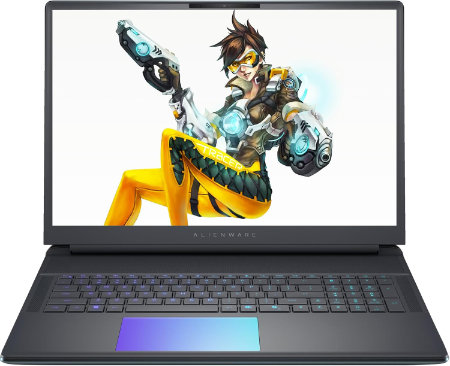
Dell Alienware 16 Area 51 Core Ultra 9 290HX Plus RTX5070 32GB 1TB OLED 240Hz |
|
|---|---|
 Check This On Amazon |
|
| CPU | Intel Core Ultra 9 290HX Plus, 24 cores, up to 5.5 GHz |
| GPU | NVIDIA GeForce RTX 5070 Laptop GPU, 8GB GDDR7 |
| Display Size | 16 inch, 16:10 |
| Display Resolution | 16 inch WQXGA 2560 × 1600 anti glare OLED, 240Hz, 120% DCI P3 color volume, 620 nits HDR, G SYNC |
| RAM | 32GB DDR5 6400 MT/s, 2 × 16GB CSoDIMM |
| Storage Space | 1TB M.2 2230 PCIe Gen 4 ×4 TLC SSD |
| Operating System | Windows 11 Home or Windows 11 Pro |
| Ports | Global headset jack; 3 × USB A 3.2 Gen 1; 2 × Thunderbolt 4 for RTX 5070 and lower or 2 × Thunderbolt 5 for RTX 5070 Ti and higher; HDMI 2.1; SD card reader |
| Dimensions (L x W x H) | 14.37 × 11.41 × up to 1.12 inches (width × depth × maximum height) |
| Weight | 7.49 lb maximum system weight |
| Pros | Desktop class graphics options; high refresh OLED; 96Wh battery; user replaceable DDR5 memory and multiple SSD capacity options. NVIDIA GeForce RTX 5070 Laptop GPU, 8GB GDDR7 makes this suitable for high end gaming and demanding GPU work. |
| Cons | Very heavy for daily travel; large power adapter; high GPU tiers draw substantial power and create heat under sustained gaming |
Dell Alienware 16 Area 51 Core Ultra 9 290HX Plus RTX5070Ti 32GB 1TB OLED 240Hz |
|
|---|---|
Check This On Amazon |
|
| CPU | Intel Core Ultra 9 290HX Plus, 24 cores, up to 5.5 GHz |
| GPU | NVIDIA GeForce RTX 5070 Ti Laptop GPU, 12GB GDDR7 |
| Display Size | 16 inch, 16:10 |
| Display Resolution | 16 inch WQXGA 2560 × 1600 anti glare OLED, 240Hz, 120% DCI P3 color volume, 620 nits HDR, G SYNC |
| RAM | 32GB DDR5 6400 MT/s, 2 × 16GB CSoDIMM |
| Storage Space | 1TB M.2 2230 PCIe Gen 4 ×4 TLC SSD |
| Operating System | Windows 11 Home or Windows 11 Pro |
| Ports | Global headset jack; 3 × USB A 3.2 Gen 1; 2 × Thunderbolt 4 for RTX 5070 and lower or 2 × Thunderbolt 5 for RTX 5070 Ti and higher; HDMI 2.1; SD card reader |
| Dimensions (L x W x H) | 14.37 × 11.41 × up to 1.12 inches (width × depth × maximum height) |
| Weight | 7.49 lb maximum system weight |
| Pros | Desktop class graphics options; high refresh OLED; 96Wh battery; user replaceable DDR5 memory and multiple SSD capacity options. NVIDIA GeForce RTX 5070 Ti Laptop GPU, 12GB GDDR7 makes this suitable for high end gaming and demanding GPU work. |
| Cons | Very heavy for daily travel; large power adapter |
Dell Alienware 16 Area 51 Core Ultra 9 290HX Plus RTX5080 32GB 1TB OLED 240Hz |
|
|---|---|
Check This On Amazon |
|
| CPU | Intel Core Ultra 9 290HX Plus, 24 cores, up to 5.5 GHz |
| GPU | NVIDIA GeForce RTX 5080 Laptop GPU, 16GB GDDR7 |
| Display Size | 16 inch, 16:10 |
| Display Resolution | 16 inch WQXGA 2560 × 1600 anti glare OLED, 240Hz, 120% DCI P3 color volume, 620 nits HDR, G SYNC |
| RAM | 32GB DDR5 6400 MT/s, 2 × 16GB CSoDIMM |
| Storage Space | 1TB M.2 2230 PCIe Gen 4 ×4 TLC SSD |
| Operating System | Windows 11 Home or Windows 11 Pro |
| Ports | Global headset jack; 3 × USB A 3.2 Gen 1; 2 × Thunderbolt 4 for RTX 5070 and lower or 2 × Thunderbolt 5 for RTX 5070 Ti and higher; HDMI 2.1; SD card reader |
| Dimensions (L x W x H) | 14.37 × 11.41 × up to 1.12 inches (width × depth × maximum height) |
| Weight | 7.49 lb maximum system weight |
| Pros | Desktop class graphics options; high refresh OLED; 96Wh battery; user replaceable DDR5 memory and multiple SSD capacity options. NVIDIA GeForce RTX 5080 Laptop GPU, 16GB GDDR7 makes this suitable for high end gaming and demanding GPU work. |
| Cons | Very heavy for daily travel; large power adapter; high GPU tiers draw substantial power and create heat under sustained gaming. |
Dell Alienware 16 Area 51 Core Ultra 9 290HX Plus RTX5090 32GB 1TB OLED 240Hz |
|
|---|---|
Check This On Amazon |
|
| CPU | Intel Core Ultra 9 290HX Plus, 24 cores, up to 5.5 GHz |
| GPU | NVIDIA GeForce RTX 5090 Laptop GPU, 24GB GDDR7 |
| Display Size | 16 inch, 16:10 |
| Display Resolution | 16 inch WQXGA 2560 × 1600 anti glare OLED, 240Hz, 120% DCI P3 color volume, 620 nits HDR, G SYNC |
| RAM | 32GB DDR5 6400 MT/s, 2 × 16GB CSoDIMM |
| Storage Space | 1TB M.2 2230 PCIe Gen 4 ×4 TLC SSD |
| Operating System | Windows 11 Home or Windows 11 Pro |
| Ports | Global headset jack; 3 × USB A 3.2 Gen 1; 2 × Thunderbolt 4 for RTX 5070 and lower or 2 × Thunderbolt 5 for RTX 5070 Ti and higher; HDMI 2.1; SD card reader |
| Dimensions (L x W x H) | 14.37 × 11.41 × up to 1.12 inches (width × depth × maximum height) |
| Weight | 7.49 lb maximum system weight |
| Pros | Desktop class graphics options; high refresh OLED; 96Wh battery; user replaceable DDR5 memory and multiple SSD capacity options. NVIDIA GeForce RTX 5090 Laptop GPU, 24GB GDDR7 makes this suitable for high end gaming and demanding GPU work. |
| Cons | |
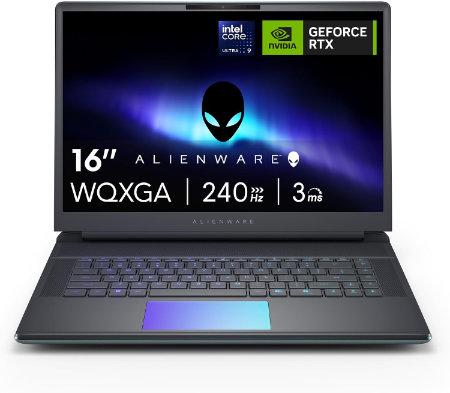
Dell Alienware 16 Area 51 Core Ultra 9 290HX Plus RTX5090 64GB 2TB OLED 240Hz |
|
|---|---|
 Check This On Amazon |
|
| CPU | Intel Core Ultra 9 290HX Plus, 24 cores, up to 5.5 GHz |
| GPU | NVIDIA GeForce RTX 5090 Laptop GPU, 24GB GDDR7 |
| Display Size | 16 inch, 16:10 |
| Display Resolution | 16 inch WQXGA 2560 × 1600 anti glare OLED, 240Hz, 120% DCI P3 color volume, 620 nits HDR, G SYNC |
| RAM | 64GB DDR5 6400 MT/s, 2 × 32GB CSoDIMM |
| Storage Space | 2TB M.2 2280 PCIe Gen 5 SSD |
| Operating System | Windows 11 Home or Windows 11 Pro |
| Ports | Global headset jack; 3 × USB A 3.2 Gen 1; 2 × Thunderbolt 4 for RTX 5070 and lower or 2 × Thunderbolt 5 for RTX 5070 Ti and higher; HDMI 2.1; SD card reader |
| Dimensions (L x W x H) | 14.37 × 11.41 × up to 1.12 inches (width × depth × maximum height) |
| Weight | 7.49 lb maximum system weight |
| Pros | Desktop class graphics options; high refresh OLED; 96Wh battery; user replaceable DDR5 memory and multiple SSD capacity options |
| Cons | Very heavy for daily travel |
Dell Alienware 16X Aurora Ultra7 270HXPlus RTX5060 16GB 512GB OLED 240Hz |
|
|---|---|
 Check This On Amazon |
|
| CPU | Intel Core Ultra 7 270HX Plus, 20 cores, up to 5.3 GHz |
| GPU | NVIDIA GeForce RTX 5060 Laptop GPU, 8GB GDDR7 |
| Display Size | 16 inch, 16:10 |
| Display Resolution | 16 inch WQXGA 2560 × 1600 anti glare OLED, 240Hz, 120% DCI P3 color volume, 620 nits HDR, G SYNC |
| RAM | 16GB DDR5 5600 MT/s, 2 × 8GB |
| Storage Space | 512GB M.2 2230 PCIe Gen 4 ×4 SSD |
| Operating System | Windows 11 Home |
| Ports | 2 × USB A 5Gbps; 1 × USB C 10Gbps with Power Delivery; 1 × Thunderbolt 4 with DisplayPort 2.1; HDMI 2.1; 1GbE RJ45; headset jack; power connector |
| Dimensions (L x W x H) | 14.05 × 10.45 × 0.92 inches at rear (width × depth × maximum rear height) |
| Weight | 5.66 lb starting weight |
| Pros | 240Hz OLED; 96Wh battery; RTX 50 Series graphics; socketed DDR5 memory and high speed NVMe storage options. NVIDIA GeForce RTX 5060 Laptop GPU, 8GB GDDR7 supports gaming and GPU accelerated creative applications. |
| Cons | 5.66 lb starting weight; OLED and high performance GPU consume substantial power; |
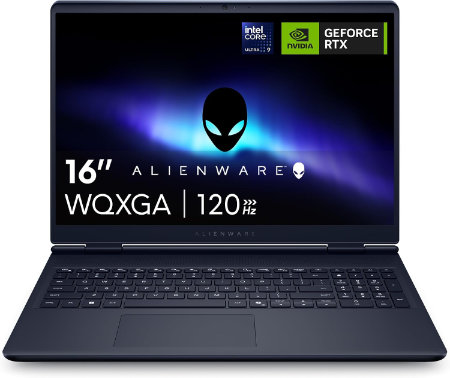
Dell Alienware 16X Aurora Ultra9 290HXPlus RTX5060 32GB 1TB OLED 240Hz |
|
|---|---|
 Check This On Amazon |
|
| CPU | Intel Core Ultra 9 290HX Plus, 24 cores, up to 5.5 GHz |
| GPU | NVIDIA GeForce RTX 5060 Laptop GPU, 8GB GDDR7 |
| Display Size | 16 inch, 16:10 |
| Display Resolution | 16 inch WQXGA 2560 × 1600 anti glare OLED, 240Hz, 120% DCI P3 color volume, 620 nits HDR, G SYNC |
| RAM | 32GB DDR5 5600 MT/s, 2 × 16GB |
| Storage Space | 1TB M.2 PCIe NVMe SSD |
| Operating System | Windows 11 Home |
| Ports | 2 × USB A 5Gbps; 1 × USB C 10Gbps with Power Delivery; 1 × Thunderbolt 4 with DisplayPort 2.1; HDMI 2.1; 1GbE RJ45; headset jack; power connector |
| Dimensions (L x W x H) | 14.05 × 10.45 × 0.92 inches at rear (width × depth × maximum rear height) |
| Weight | 5.66 lb starting weight |
| Pros | 240Hz OLED; 96Wh battery; RTX 50 Series graphics; socketed DDR5 memory and high speed NVMe storage options. NVIDIA GeForce RTX 5060 Laptop GPU, 8GB GDDR7 supports gaming and GPU accelerated creative applications. |
| Cons | 16GB base memory can be limiting for heavy applications. |
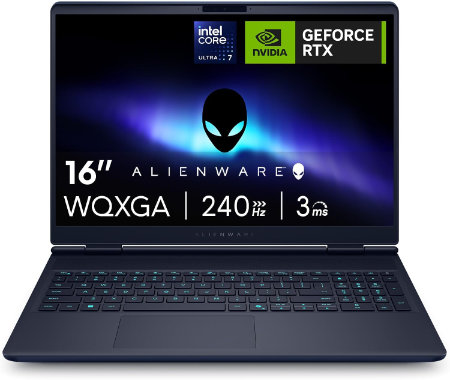
Dell Alienware 16X Aurora Ultra9 290HXPlus RTX5070 32GB 1TB OLED 240Hz |
|
|---|---|
 Check This On Amazon |
|
| CPU | Intel Core Ultra 9 290HX Plus, 24 cores, up to 5.5 GHz |
| GPU | NVIDIA GeForce RTX 5070 Laptop GPU, 8GB GDDR7 |
| Display Size | 16 inch, 16:10 |
| Display Resolution | 16 inch WQXGA 2560 × 1600 anti glare OLED, 240Hz, 120% DCI P3 color volume, 620 nits HDR, G SYNC |
| RAM | 32GB DDR5 5600 MT/s, 2 × 16GB |
| Storage Space | 1TB M.2 PCIe NVMe SSD |
| Operating System | Windows 11 Home |
| Ports | 2 × USB A 5Gbps; 1 × USB C 10Gbps with Power Delivery; 1 × Thunderbolt 4 with DisplayPort 2.1; HDMI 2.1; 1GbE RJ45; headset jack; power connector |
| Dimensions (L x W x H) | 14.05 × 10.45 × 0.92 inches at rear (width × depth × maximum rear height) |
| Weight | 5.66 lb starting weight |
| Pros | 240Hz OLED; 96Wh battery; RTX 50 Series graphics; socketed DDR5 memory and high speed NVMe storage options. |
| Cons | |
Dell Alienware 16X Aurora Ultra9 290HXPlus RTX5070Ti 32GB 2TB OLED 240Hz |
|
|---|---|
Check This On Amazon |
|
| CPU | Intel Core Ultra 9 290HX Plus, 24 cores, up to 5.5 GHz |
| GPU | NVIDIA GeForce RTX 5070 Ti Laptop GPU, 12GB GDDR7 |
| Display Size | 16 inch, 16:10 |
| Display Resolution | 16 inch WQXGA 2560 × 1600 anti glare OLED, 240Hz, 120% DCI P3 color volume, 620 nits HDR, G SYNC |
| RAM | 32GB DDR5 5600 MT/s, 2 × 16GB |
| Storage Space | 2TB M.2 2280 PCIe Gen 5 SSD |
| Operating System | Windows 11 Home |
| Ports | 2 × USB A 5Gbps; 1 × USB C 10Gbps with Power Delivery; 1 × Thunderbolt 4 with DisplayPort 2.1; HDMI 2.1; 1GbE RJ45; headset jack; power connector |
| Dimensions (L x W x H) | 14.05 × 10.45 × 0.92 inches at rear (width × depth × maximum rear height) |
| Weight | 5.66 lb starting weight |
| Pros | 240Hz OLED; 96Wh battery; RTX 50 Series graphics; socketed DDR5 memory and high speed NVMe storage options |
| Cons | 5.66 lb starting weight |
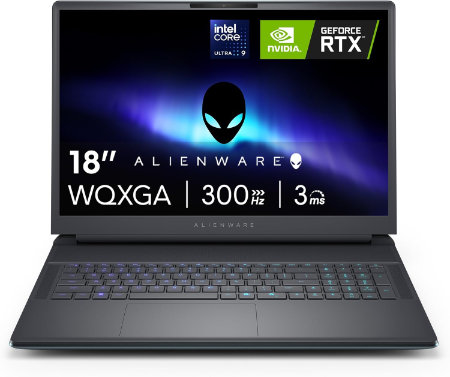
Dell Alienware 18 Area 51 Core Ultra 9 290HX Plus RTX5070Ti 32GB 1TB WQXGA 300Hz |
|
|---|---|
 Check This On Amazon |
|
| CPU | Intel Core Ultra 9 290HX Plus, 24 cores, up to 5.5 GHz |
| GPU | NVIDIA GeForce RTX 5070 Ti Laptop GPU, 12GB GDDR7 |
| Display Size | 18 inch, 16:10 |
| Display Resolution | 18 inch WQXGA 2560 × 1600, 300Hz, 500 nits, 100% DCI P3, Advanced Optimus, ComfortView Plus and G SYNC |
| RAM | 32GB DDR5 6400 MT/s, 2 × 16GB CSoDIMM |
| Storage Space | 1TB M.2 2230 PCIe Gen 4 ×4 TLC SSD |
| Operating System | Windows 11 Home or Windows 11 Pro |
| Ports | USB A 3.2 Gen 1; USB C Thunderbolt ports depending on GPU tier; HDMI 2.1; SD card reader; global headset jack; RJ45 Ethernet |
| Dimensions (L x W x H) | 16.14 × 12.59 × 0.95 inches at front (width × depth × front height) |
| Weight | 9.56 lb maximum system weight |
| Pros | Very large 300Hz screen; flagship RTX 50 Series GPU options; 96Wh battery; replaceable DDR5 memory and multiple SSD options |
| Cons | 9.56 lb maximum laptop weight plus a 2.20 lb power adapter; large desk focused chassis; battery life is short during gaming |
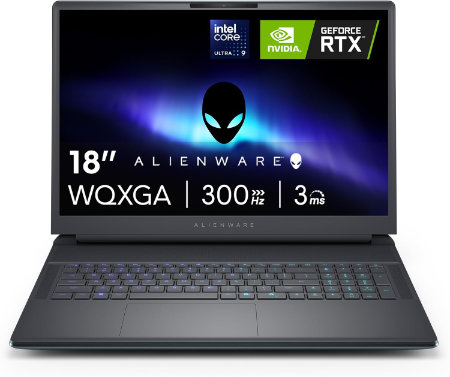
Dell Alienware 18 Area 51 Core Ultra 9 290HX Plus RTX5080 32GB 1TB WQXGA 300Hz |
|
|---|---|
 Check This On Amazon |
|
| CPU | Intel Core Ultra 9 290HX Plus, 24 cores, up to 5.5 GHz |
| GPU | NVIDIA GeForce RTX 5080 Laptop GPU, 16GB GDDR7 |
| Display Size | 18 inch, 16:10 |
| Display Resolution | 18 inch WQXGA 2560 × 1600, 300Hz, 500 nits, 100% DCI P3, Advanced Optimus, ComfortView Plus and G SYNC |
| RAM | 32GB DDR5 6400 MT/s, 2 × 16GB CSoDIMM |
| Storage Space | 1TB M.2 2230 PCIe Gen 4 ×4 TLC SSD |
| Operating System | Windows 11 Home or Windows 11 Pro |
| Ports | USB A 3.2 Gen 1; USB C Thunderbolt ports depending on GPU tier; HDMI 2.1; SD card reader; global headset jack; RJ45 Ethernet |
| Dimensions (L x W x H) | 16.14 × 12.59 × 0.95 inches at front (width × depth × front height) |
| Weight | 9.56 lb maximum system weight |
| Pros | Very large 300Hz screen; flagship RTX 50 Series GPU options; 96Wh battery; replaceable DDR5 memory and multiple SSD options. NVIDIA GeForce RTX 5080 Laptop GPU, 16GB GDDR7 is suited to high resolution gaming, streaming and GPU accelerated creation. |
| Cons | |
Dell Alienware 18 Area 51 Core Ultra 9 290HX Plus RTX5090 32GB 1TB WQXGA 300Hz |
|
|---|---|
Check This On Amazon |
|
| CPU | Intel Core Ultra 9 290HX Plus, 24 cores, up to 5.5 GHz |
| GPU | NVIDIA GeForce RTX 5090 Laptop GPU, 24GB GDDR7 |
| Display Size | 18 inch, 16:10 |
| Display Resolution | 18 inch WQXGA 2560 × 1600, 300Hz, 500 nits, 100% DCI P3, Advanced Optimus, ComfortView Plus and G SYNC |
| RAM | 32GB DDR5 6400 MT/s, 2 × 16GB CSoDIMM |
| Storage Space | 1TB M.2 2230 PCIe Gen 4 ×4 TLC SSD |
| Operating System | Windows 11 Home or Windows 11 Pro |
| Ports | USB A 3.2 Gen 1; USB C Thunderbolt ports depending on GPU tier; HDMI 2.1; SD card reader; global headset jack; RJ45 Ethernet |
| Dimensions (L x W x H) | 16.14 × 12.59 × 0.95 inches at front (width × depth × front height) |
| Weight | 9.56 lb maximum system weight |
| Pros | Very large 300Hz screen; flagship RTX 50 Series GPU options; 96Wh battery; replaceable DDR5 memory and multiple SSD options |
| Cons | |
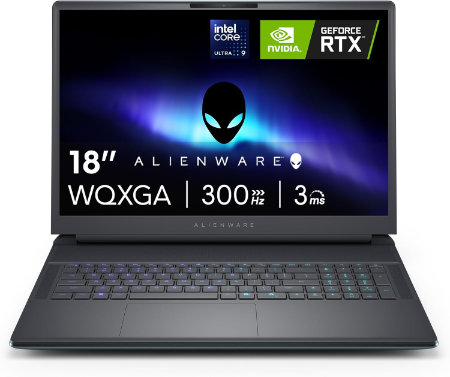
Dell Alienware 18 Area 51 Core Ultra 9 290HX Plus RTX5090 64GB 2TB WQXGA 300Hz |
|
|---|---|
 Check This On Amazon |
|
| CPU | Intel Core Ultra 9 290HX Plus, 24 cores, up to 5.5 GHz |
| GPU | NVIDIA GeForce RTX 5090 Laptop GPU, 24GB GDDR7 |
| Display Size | 18 inch, 16:10 |
| Display Resolution | 18 inch WQXGA 2560 × 1600, 300Hz, 500 nits, 100% DCI P3, Advanced Optimus, ComfortView Plus and G SYNC |
| RAM | 64GB DDR5 6400 MT/s, 2 × 32GB CSoDIMM |
| Storage Space | 2TB M.2 2280 PCIe Gen 5 SSD |
| Operating System | Windows 11 Home or Windows 11 Pro |
| Ports | USB A 3.2 Gen 1; USB C Thunderbolt ports depending on GPU tier; HDMI 2.1; SD card reader; global headset jack; RJ45 Ethernet |
| Dimensions (L x W x H) | 16.14 × 12.59 × 0.95 inches at front (width × depth × front height) |
| Weight | 9.56 lb maximum system weight |
| Pros | Very large 300Hz screen; flagship RTX 50 Series GPU options; 96Wh battery; replaceable DDR5 memory and multiple SSD options. |
| Cons | 9.56 lb maximum laptop weight plus a 2.20 lb power adapter; large desk focused chassis; battery life is short during gaming. Consider a RAM upgrade for demanding video work or large local development environments. |